AI Agent Fundamentals: Everything You Need to Know
You hear the term “AI Agent” everywhere — on LinkedIn, in strategy reports, from competitors. But what exactly is an AI Agent, and why should your business care?
This article decodes the entire platform: from definition, to architecture, to actual implementation. No buzzwords, no empty theories. Just what you really need to know to make a decision.
What Is an AI Agent?
AI Agent is a capable software system autonomous — it doesn’t just answer questions like a traditional chatbot, it can observe the environment, plan, and execute actions to achieve specific goals.
Core differences:
- Traditional Chatbots: Receive input → Return output. End.
- AI Agent: Get goals → Analyze → Plan → Execute → Observe results → Adjust → Repeat until the goal is achieved.
This means that AI Agent does not wait for you to ask before doing anything. It proactively thinks, breaks down problems, and acts on its own — the same way a good employee solves tasks on his or her own without micro-management.
Real-life Examples
Instead of asking the chatbot: “Write me a marketing email”, you assign to AI Agent: “Create email campaigns for VIP customers, segment by purchasing behavior, write content, schedule sending, and track results.”
Agent will:
1. Connect to CRM → get customer data
2. Segment → group by behavior
3. Write content → customize each group
4. Schedule → send via email platform
5. Monitor → report results
That’s the difference between tools and colleagues.
Why Are AI Agents Appearing Now?
Three factors converge to create a golden time for AI Agents:
LLM maturity. GPT-4, Claude, Gemini have reached a level of reasoning good enough to trust with decision-making. Not perfect, but good enough for most business tasks.
API economy. Every important SaaS has an API. The agent does not need to “hack” into the system — it communicates through an official, secure interface with an audit trail.
Cost efficiency. Token cost reduced by 90% in 2 years. Running an agent 24/7 is cheaper than hiring a part-time intern. The ROI case is clear, it is no longer an “investment for the future”.
Combining the above three factors, AI Agents move from “proof of concept” to “production-ready” — and businesses that wait will lose their advantage.
Architecture Of An AI Agent
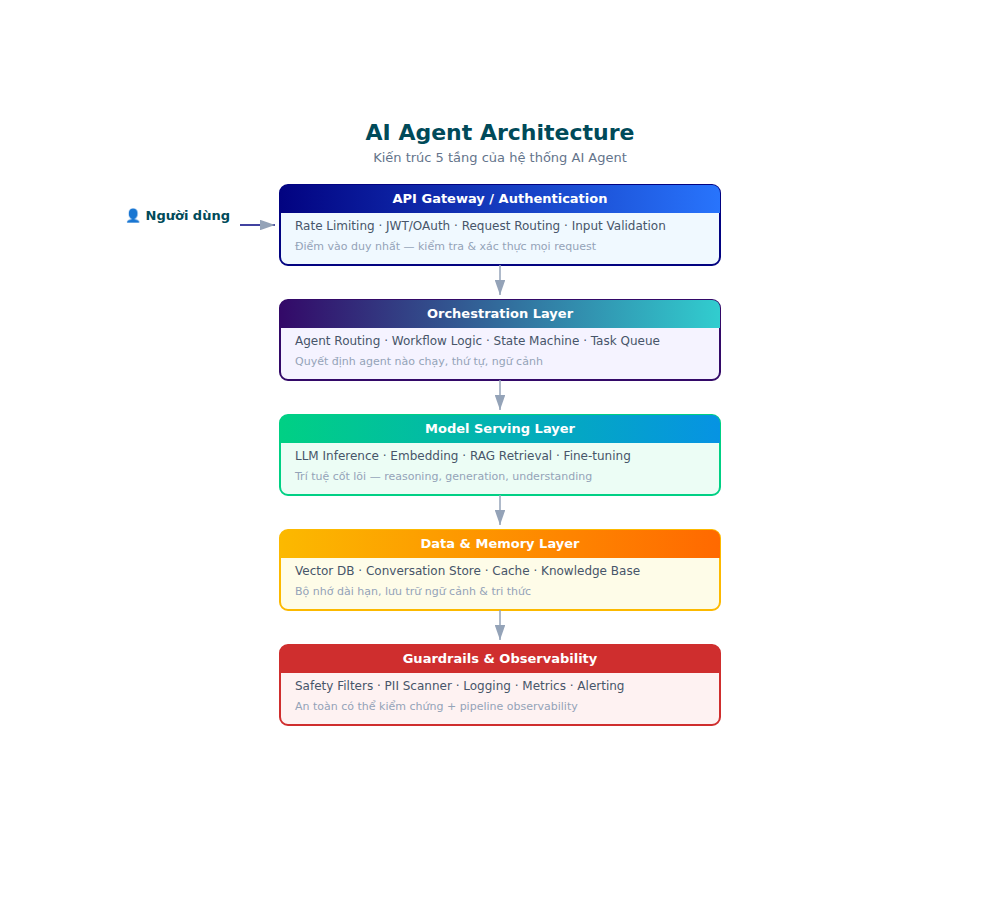
Every AI Agent operates based on a loop Observe → Think → Act → Reflect. This is the backbone of every agent system, from simple to complex.
1. Observability — The ability to observe
Agent needs see operating environment. This comes from:
- APIs: Connect to CRM, email, database, analytics
- Sensors: Real-time data (web traffic, logs, user behavior)
- Context window: Ability to remember conversations and task status
Without observability, agents are like blindfolded employees — knowing what to do but not knowing where they are.
2. Reasoning — The Ability to Reason
This is where LLM (Large Language Model) comes into play brain. Agents used:
- Chain-of-thought: Reason step by step, explain the decision
- Planning: Divide large goals into sub-tasks, prioritize in order
- Tool selection: Decide which tool to use for which task
For example: When receiving a task “find abandoned customers”, agent reasoning as follows:
“I need to check engagement data → compare with threshold → define list → compose personalized emails for each person → schedule to send.”
3. Action — The ability to act
Agent needs limbs — the ability to execute real-world actions:
- Send emails, create tasks, update database
- Call third-party APIs (Stripe, Shopify, Google Sheets)
- Create content (articles, reports, images)
- Access file system and code execution
Action is what the agent turns from “smart but useless” wall “smart and effective”.
4. Memory — Memory
Agents need to remember three types of information:
- Short-term memory: Current conversation context (context window)
- Long-term memory: Accumulated knowledge, user preferences, interaction history
- Procedural memory: How to perform each type of task (workflow templates)
Good memory = agent does not ask questions about things it already knows. Like a long-time employee, there’s no need to start over again.
Architecture Comparison: Simple vs Complex Agents
Before classifying, it is necessary to understand agent architecture varies according to complexity. This is not “one size fits all.”
Single-Agent Architecture
An LLM does everything: reasoning, planning, action. Tools attach directly to the agent.
Pros: Simple, easy to debug, quick to deploy.
Disadvantages: Context window is limited, easy to overload when the task is complex, and difficult to expand.
Suitable for: Single linear task, few steps, narrow domain.
Multi-Agent Architecture
Many specialized agents, each in charge of a domain. Orchestrator coordinates.
Pros: Specialist agents are better than generalist, scale by adding agents, good fault isolation.
Disadvantages: Complex setup, higher latency (agents communicate with each other), more difficult debugging.
Suitable for: Workflow is cross-function, many steps, requires multi-field expertise.
Human-in-the-Loop Architecture
Agent executes, but important decisions require human approval. Hybrid models are the most popular in the business.
Pros: Secure, compliant, builds trust gradually.
Disadvantages: Slower than fully autonomous, needs UX for approval flow.
Suitable for: Financial transactions, customer-facing actions, legal workflows.
Choosing the wrong architecture = waste of time and money. Start simple, add complexity when the data proves necessary.
Classification of AI Agents
Not all AI Agents are the same. Understanding classification helps you choose the right tool for the right problem.
Reactive Agents
- React according to specific triggers
- There is no memory between interactions
- Suitable: Repetitive tasks, fixed processes
- For example: Agent sends an email to wish a customer a happy birthday
Deliberative Agents
- There is planning and reasoning
- Consider multiple options before taking action
- Suitable: Task needs strategy, many steps, and constraints
- For example: Agent sets up a marketing campaign with a budget constraint
Hybrid Agents
- Combine reactive + deliberative
- React quickly when needed, plan when there is time
- This is the most common pattern in business practice
Multi-Agent Systems
- Multiple agents cooperate, each taking on a specialized role
- Agents communicate, delegate tasks, and synthesize results
- Suitable: Complex workflow, needs multi-disciplinary expertise
- Read more: How Multi-Agent Systems Work
AI Agents vs Traditional Chatbots
Many businesses confuse AI Agent with upgraded chatbots. This is an expensive mistake.
| Criteria | Chatbot | AI Agent |
|---|---|---|
| Target | Answer the question | Complete the task |
| Action ability | Are not | Yes (API, tools) |
| Autonomy | No — wait for input | Yes — proactive enforcement |
| Memory | Limit | Full (short + long-term) |
| Planning | Are not | Yes — split, prioritize |
| Scope | 1 conversation | Multi-step workflows |
Chatbot replied “Okay, I will help you”. Real agent do and report back “Done, this is the result”.
To understand this difference more deeply, see the detailed analysis: AI Agents vs Traditional Chatbots
Tools & Function Calling: How Agents Interact with the World
Agents do not live in a vacuum. Ability call external function — calling APIs, accessing databases, sending emails — is what turns agents from “smart but useless” to “smart and effective.”
How Does Function Calling Work?
- Agent analyzes tasks → Determine what tools are needed
- Agent makes function call → structured JSON with function name and parameters
- Runtime executes → call API, return results to agent
- Agent processes the results → decide on the next step
For example, when an agent needs to send an email:
{
  "function": "send_email",
  "parameters": {
    "to": "customer@example.com",
    "subject": "Thank you for your purchase",
    "body": "Hello..."
  }
}
Runtime executes, returns {"status": "sent", "message_id": "..."}, and the agent continues the workflow.
Categories of Tools
- Data tools: Search, query database, read files
- Action tools: Send emails, create tasks, update CRM, call APIs
- Communication tools: Slack, email, SMS notifications
- Computation tools: Calculator, data analysis, chart generation
- Browser tools: Web scraping, form filling, UI testing
Golden rule: Every tool should do one thing and do it well. Agent reasoning about When Which tool to use? Don’t create a super-tool that does everything — agents will confuse.
Guardrails for Tool Access
Do not allow agents to access all tools from the beginning:
- Whitelist: Only allow tools necessary for the specific use case
- Rate limiting: Limit the number of tool calls in the time window
- Approval gates: Sensitive tools (deleting data, sending money) require human confirmation
- Dry run: Run simulation before real execution
Multi-Agent Systems: When One Agent Is Not Enough
When complex business problems — marketing, sales, customer success run in parallel — a single agent becomes the bottleneck. Solution: multi-agent AI systems (multi-agent systems).
How It Works
Each agent plays a specialized role:
- Research Agent → Collect market data
- Content Agent → Write articles, create creativity
- Review Agent → Check quality and brand consistency
- Distribution Agent → Publish, schedule, track
Orchestrator manages the workflow between agents, ensuring:
- Task with the right agent, at the right time
- Conflict resolved (for example: two agents want to update the same record)
- Aggregated results before returning to user
Benefits for Businesses
- Specialization: Each agent is good at one thing, instead of one agent being bad at everything
- Scalability: Add agents for new tasks without destroying the old system
- Resilience: One agent fails, another agent takes over
- Parallel execution: Multiple tasks run at the same time, increasing processing speed
See details on how to build multi-agent systems: How Multi-Agent Systems Work
AI Orchestration: Brain Coordination
AI Orchestration is the layer that manages how agents coordinate — who does what, when, in what order.
Popular Orchestration Patterns
Sequential Pipeline
Agent A finished → Agent B → Agent C. Simple, easy to debug, but slow.
Suitable: Linear workflow like content pipeline (research → write → edit → publish).
Parallel Fan-out
Orchestrator assigns tasks to multiple agents running simultaneously. Summary results at the end.
Suitable: Independent tasks such as analyzing data from multiple sources at the same time.
Hierarchical
Manager agent delegates to worker agents. Worker reports back. Manager decides.
Suitable: Complex workflows need decision-making at many levels.
Event-driven
Agent reacts to events (webhook, data change, time trigger). There is no fixed flow.
Suitable: Real-time processing such as monitoring social mentions, alerting anomalies.
Popular Orchestration Frameworks
- LangGraph: Orchestration is graph-based, suitable for multi-step workflow
- CrewAI: Multi-agent collaboration with role-based assignment
- AutoGen (Microsoft): Agent conversation framework, flexible for many patterns
- OpenAI Assistants API: Simple, managed, suitable for MVP
Deploying AI Agents for Businesses
Step 1: Identify the Correct Use Case
Don’t deploy AI Agent because it’s “hot”. Implement because it solves a specific problem.
Use cases suitable for AI Agent:
- Repetitive, time-consuming tasks (data entry, report generation)
- Multi-step workflow requires coordination of multiple systems (customer onboarding)
- Large-scale data analysis (market research, competitive analysis)
- Content creation pipeline (research → outline → write → review → publish)
Use cases that are NOT suitable:
- Task needs deep empathy (crisis consulting)
- One-time high-stakes decision (M&A, legal judgment)
- Tasks are efficient with simple automation (cron job, Zapier)
Step 2: Choose Architecture
- Single agent for simple tasks with few steps
- Multi-agent for complex workflows, lots of domain expertise
- Hybrid human-in-the-loop for tasks requiring approval (financial, legal)
Step 3: Design Tools & APIs
An agent is only as good as the tools it accesses. Map out:
- Data sources: CRM, analytics, database
- Action endpoints: Email API, social API, payment API
- Internal tools: Custom functions for specific operations
- Guardrails: Approval gates for sensitive actions
Step 4: Testing & Guardrails
AI Agent can hallucinate — make wrong decisions. Required Guardrails:
- Approval gates: Important actions require human confirmation
- Output validation: Check the results before executing
- Rate limiting: Limit the number of actions per time window
- Monitoring: Log every decision, review periodically
- Fallback: Human takeover when the agent encounters an edge case
Step 5: Measure & Iterate
Important Metrics:
- Task completion rate: % tasks completed without human intervention
- Time saved: Hours saved compared to manual process
- Error rate: % of actions that need correction
- Cost per task: API cost + infrastructure / number of completed tasks
Common Mistakes
1. Over-Engineering From the Start
Many businesses build complex multi-agent systems for problems that a simple agent can solve. Start simple. Run single agent first, add complexity as needed.
In fact, 80% of business tasks that businesses want to use AI Agent can be solved with single agent + good tools. Multi-agent is only needed when the workflow is truly cross-functional and requires deep specialization.
2. Ignore Human-in-the-Loop
AI Agent autonomy does not mean that it does not need supervision. For every action that affects customers, money, or brands — there’s always human approval.
Risk classification framework:
– Low risk: Agent’s freedom of action (internal reports, data formatting)
– Medium risk: Agent recommendation, human review (content publishing, customer emails)
– High risk: Human approval before execution (payments, data deletion, legal commitments)
3. Not Investing In Data & API Layer
Agents are good but without data they are useless. Invest in API connections, data pipelines, and integrations before optimizing agent logic.
Rule of thumb: Spend 60% of effort on data/tool layer, 30% on agent logic, 10% on UI. Most businesses do the opposite — and fail.
4. Expect Perfect the First Time
Agent needs time to learn and tune. Run pilot, collect feedback, iterate. Like onboarding new employees — need a training period.
Expect 2-4 weeks for pilot, 1-3 months for production-ready. Measure improvement over time, don’t compare with human experts on the same day.
5. Ignore Cost Management
Token costs add up quickly. The agent runs loop reasoning multiple times for a task, each time calling LLM. No cost monitoring = unexpected bills.
Best practices:
– Set budget per task type
– Cache reasoning results cho similar queries
– Use smaller models cho routine decisions, reserve large models cho complex reasoning
– Monitor daily spend and alert when threshold is exceeded
AI Agents Trends In 2026
Agents-as-a-Service
Instead of building their own, businesses will subscribe to agent platforms — like SaaS but for AI workers. Reduce barrier to entry, increase adoption speed.
This means that SME businesses do not need an AI engineering team. Subscribe agent, configure use case, run. Similar to how businesses use email marketing platforms instead of building their own.
Autonomous Business Functions
Not just individual tasks, AI Agents will run all business functions: marketing funnel, customer lifecycle, recruitment pipeline — with minimal human oversight.
Real life example happening:
– Marketing agent research keywords, write articles, optimize SEO, publish, track ranking
– Sales agent self-qualifies leads, sends personalized outreach, schedule demo, follow-up
– Support agent self-classifies tickets, answers common questions, escalate complex cases
Agent-to-Agent Economy
Agents communicate with agents of other businesses. Your procurement agent negotiates with the vendor’s sales agent. Agent scheduling coordinates itself with partner’s agent.
This is the next step after API economy — not just machine-to-machine data exchange, but agent-to-agent negotiation and collaboration.
Regulation & Governance
As agents become more autonomous, regulation will follow. Expect requirements for audit trail, explainability, and liability framework for AI actions.
Prepare now:
– Log every agent decision (who, what, when, why)
– Implement approval flow cho high-risk actions
– Document agent capabilities and limitations are clear
– Set up incident response plan for agent errors
Specialized Agents Over Generalists
The trend is shifting from “one agent doing everything” to specialized agents — each agent is good at one domain. Similar to how businesses hire specialists instead of generalists.
Marketing agents are good at marketing. Sales agents are good at sales. Agent finance is good at finance. Orchestrator orchestration — no need for a super-agent who knows everything.
Where to Start?
If you are a business owner reading this, the real question is: What do I do right now?
1. Audit workflows — List the 5 tasks that consume the most of your team’s time. Who are the candidates for AI Agent?
2. Start with one agent, one task — Choose the clearest use case, build single agent, run pilot for 2-4 weeks.
3. Measure ruthlessly — Track time saved, error rate, cost. Only scale when the numbers prove the ROI.
4. Expand gradually — Add agents, add use cases. Move from single agent → multi-agent when complexity requires.
And if you want to get started right away with powerful AI coding tools to build your own agents:
GLM Coding Plan just $18/month, supports Claude Code, Cline, and 20+ coding tools — the ideal platform to start building AI Agents for your business.
AI Agent is no longer the future — it is the present. The question is not “should you use it”, but “how to use it correctly”. Start small, measure carefully, and scale as data becomes available.