Something shifted in May 2026. OpenAI’s Codex learned to use your computer — clicking, typing, seeing your screen. Microsoft announced it’s building a “super app” to unify its fractured Copilot empire. And across the industry, AI coding agents stopped being fancy autocomplete and started becoming autonomous coworkers.
If you’re a developer, tech lead, or CTO, this isn’t another “AI will replace programmers” thinkpiece. This is a practical breakdown of what’s actually happening, which tools are winning, and what it means for how you’ll write software next year.
What Are AI Coding Agents (And Why Now)?
AI coding agents are not chatbots that spit code snippets. They’re autonomous systems that can understand a task, navigate a codebase, run tests, fix errors, and ship working code — often without step-by-step human instruction.
The difference matters:
| Aspect | AI Code Assistant | AI Coding Agent |
|---|---|---|
| Input | Single prompt | Multi-step task description |
| Scope | One function at a time | Entire feature or workflow |
| Tooling | Text completion | File system, terminal, browser, APIs |
| Memory | Conversation-only | Project context, past corrections |
| Autonomy | Suggests, you approve | Plans, executes, iterates, reports back |
The shift happened because three capabilities matured simultaneously:
- Context windows got huge — Models can now hold entire codebases in working memory
- Tool use got reliable — Agents can reliably execute shell commands, read files, call APIs
- Reasoning got good enough — Chain-of-thought and planning models can decompose complex tasks
The result: agents that don’t just suggest code, but do the work.
The Big Three: Codex vs Claude Code vs Cursor
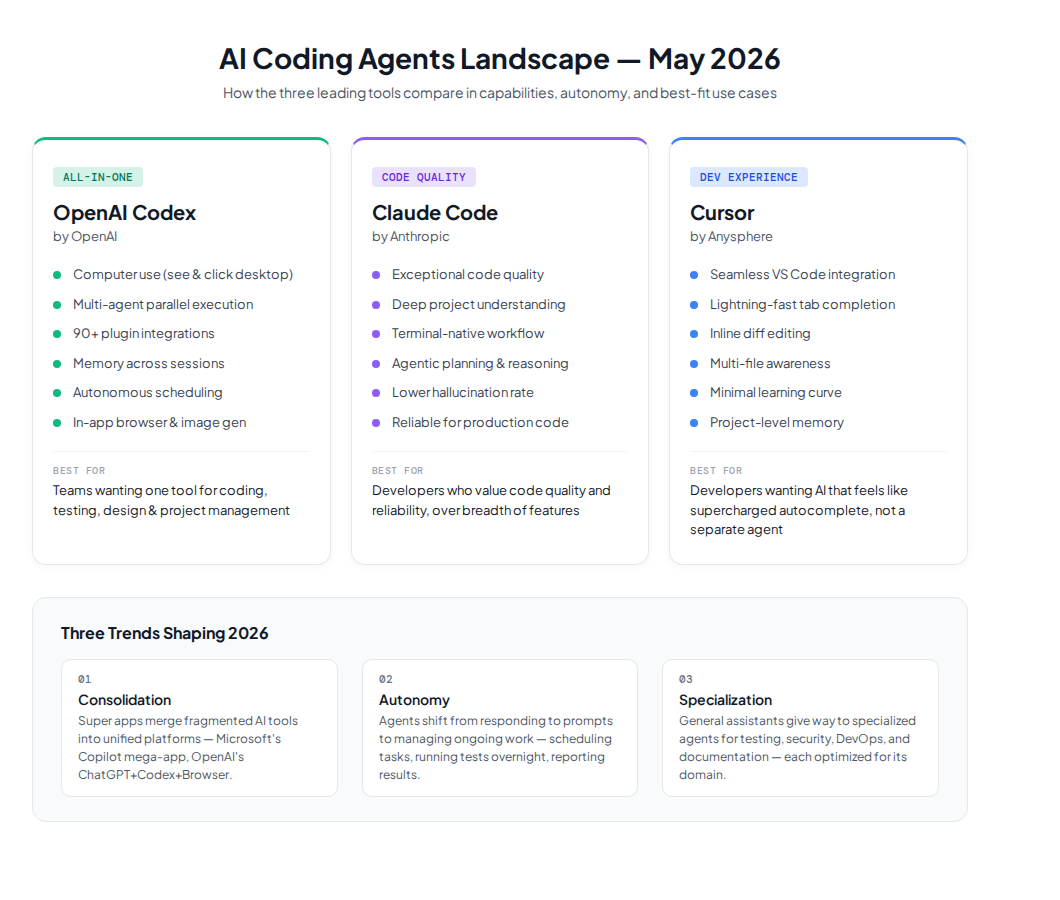
Three tools dominate the AI coding agent conversation right now. Here’s how they actually compare, beyond the marketing.
OpenAI Codex — The Swiss Army Knife
Codex launched as a terminal-based coding agent in 2025. By May 2026, it’s become something much more ambitious.
What Codex does well:
– Multi-agent parallel execution — spin up several agents, each working on different tasks simultaneously
– 90+ integrations via plugins (GitLab, Atlassian, Microsoft Suite, CircleCI, and more)
– Desktop computer use — sees your screen, clicks, types, works in any app, not just your IDE
– In-app browser — navigate web pages, comment directly on them for the agent
– Image generation with gpt-image-1.5 — create mockups, UI concepts, diagrams inline
– Memory — remembers your preferences, corrections, and context across sessions
Where it lags:
– macOS-only for computer use (Windows coming, Linux unclear)
– EU/UK users wait longer for personalization features
– The “do everything” approach can feel overwhelming for focused coding tasks
Pricing: Included with ChatGPT Pro ($200/mo), Plus users get limited access
Best for: Teams that want one tool to handle coding, project management, design iteration, and documentation — especially if you’re already in the ChatGPT ecosystem.
Claude Code — The Quiet Disruptor
Anthropic’s Claude Code doesn’t have a desktop app or a splashy “computer use” demo. What it has is something developers care about more: it’s really good at coding.
What Claude Code does well:
– Exceptional code quality — Anthropic’s models consistently rank top on coding benchmarks
– Deep project understanding — reads your entire codebase, understands architecture decisions
– Terminal-native workflow — stays out of your way, works where you work
– Agentic planning — breaks down complex tasks, asks clarifying questions before acting
– Lower hallucination rate — Anthropic’s safety focus means fewer confident wrong answers
Where it lags:
– No GUI/desktop app — purely terminal-based
– Fewer integrations than Codex
– No image generation or browser control (yet)
– Smaller plugin ecosystem
Pricing: Included with Claude Pro ($20/mo) and Max ($100/mo)
Best for: Developers who want a coding partner that writes high-quality code, understands context, and doesn’t get in the way. Ideal for complex, multi-file refactors and architecture work.
Cursor — The Developer-First Experience
Cursor started as a fork of VS Code with AI baked in. It’s become the tool developers actually enjoy using.
What Cursor does well:
– Seamless IDE integration — it is your editor, not a separate tool
– Tab completion that actually predicts what you want next
– Inline editing with diff view — see changes before accepting
– Multi-file awareness — understands how your files connect
– Fast iteration — suggestions appear in milliseconds, not seconds
Where it lags:
– Less autonomous than Codex or Claude Code — more assistive than agentic
– Heavier on local resources (runs alongside VS Code)
– Cursor’s agent mode is improving but still behind Codex’s autonomous execution
– Pricing adds up for power users
Pricing: Free tier, Pro $20/mo, Business $40/mo
Best for: Developers who want AI that feels like a supercharged autocomplete and pair programmer, not a separate agent running in the background.
Quick Comparison
| Feature | Codex | Claude Code | Cursor |
|---|---|---|---|
| Code quality | Very good | Excellent | Very good |
| Autonomy | High | High | Medium |
| Computer use | ✅ (macOS) | ❌ | ❌ |
| Desktop app | ✅ | ❌ | ✅ (is the IDE) |
| Memory | ✅ | Session-only | ✅ (project-level) |
| Scheduling | ✅ | ❌ | ❌ |
| Plugins | 90+ | Limited | Moderate |
| Image gen | ✅ | ❌ | ❌ |
| In-app browser | ✅ | ❌ | ❌ |
| Best for | All-in-one teams | Pure coding quality | Developer experience |
Codex May 2026 Update: The Deep Dive
The May 2026 Codex update is the most significant single release for any coding agent this year. Here’s what actually changed and why it matters.
Computer Use: Agents That See Your Screen
This is the headline feature. Codex can now see your macOS desktop, move its own cursor, click, and type in any application — not just your code editor.
Why this matters:
– Testing without APIs — Agents can visually verify UI changes, click through flows, screenshot results
– Working in non-code apps — Figma, browser DevTools, database GUIs, spreadsheet tools
– Parallel agents — Multiple Codex agents work simultaneously without interfering with your active window
The limitation: macOS only at launch. Windows and Linux are “coming soon” with no firm date.
Memory: Learning From Every Session
Codex now remembers across sessions — your coding style preferences, past corrections, project-specific conventions. This transforms the agent from “smart search” to “experienced teammate.”
Previously, every Codex session started from scratch. You’d spend 10 minutes explaining your project conventions. Now, it learns once and applies everywhere.
Autonomous Scheduling
Codex can schedule future work. You can tell it “check the staging deploy tomorrow morning and fix any test failures” — and it will.
This is where coding agents cross from “assistant” to “coworker.” They don’t just wait for your prompt. They manage ongoing tasks across days and weeks.
90+ Plugins and Integrations
The plugin ecosystem exploded. Key additions:
– Atlassian Rovo — manage Jira issues directly from Codex
– GitLab Issues — full issue tracking integration
– CircleCI — monitor and trigger CI/CD pipelines
– Microsoft Suite — read/write Office docs inline
– Remotion — video generation workflows
This transforms Codex from a coding tool into a project management platform.
Claude Code: The Quiet Disruptor
While Codex grabbed headlines, Claude Code quietly became many developers’ daily driver. Here’s why.
Why Developers Love It
The quality difference is tangible. On complex refactoring tasks, Claude Code consistently produces code that:
– Follows existing patterns without being told
– Handles edge cases that other agents miss
– Writes tests that actually test something meaningful
– Communicates what it changed and why
This isn’t benchmark performance — it’s real-world, “I used it for a month and my PRs are better” performance.
The Terminal-First Philosophy
Claude Code’s strength is also its constraint: it lives in the terminal. No GUI, no desktop app, no browser integration.
For many developers, this is exactly right. The terminal is home. They don’t want another app; they want something that lives where they live and stays out of the way.
But if you need visual UI testing, design iteration, or multi-app workflows, Claude Code currently can’t help.
Anthropic’s Bets
Anthropic is investing heavily in coding quality and safety. Their approach:
– Rigorous testing before feature releases
– Safety-first — fewer “wow” features, fewer hallucinations
– Model improvements focused on reasoning depth, not breadth
The result is a tool that’s reliable in a way that matters for production code.
Microsoft’s Copilot Super App: The Enterprise Play
Microsoft has a problem: it has too many Copilots. GitHub Copilot for coding. Copilot Chat for conversation. Copilot Cowork for collaboration. Microsoft 365 Copilot for productivity. And none of them talk to each other well.
The solution, revealed in May 2026: a “super app” that unifies everything under one roof, including a new agentic workflow capability called Autopilot.
What We Know
- Led by Jacob Andreou, Microsoft’s head of Copilot (formerly Snap’s VP of Product)
- Combines GitHub Copilot, Copilot Chat, Copilot Cowork, and Autopilot
- Planned launch: end of summer 2026
- Toggle between personal and enterprise 365 Copilots
- New proprietary AI models from Mustafa Suleyman’s team expected at Build
Why This Matters for Developers
For enterprise teams, the fragmented Copilot experience has been the #1 complaint. You use GitHub Copilot in VS Code, switch to Copilot Chat in Teams, then open 365 Copilot for documents — and none share context.
The super app promises to fix this. Whether it delivers depends on execution, but the direction is clear: enterprise AI is consolidating into unified platforms.
The Competitive Landscape
Microsoft isn’t alone:
– OpenAI is building its own super app (ChatGPT + Codex + browser)
– Google has Gemini across Workspace
– Amazon has Q across AWS
The pattern: AI agents are becoming platforms, not tools.
Computer Use: When Agents See Your Screen
Computer use — giving an AI agent the ability to see and interact with your desktop — is the most transformative capability in the 2026 coding agent landscape.
How It Works
- The agent takes a screenshot of your screen
- It interprets what it sees (buttons, text, images, layout)
- It decides what to click, type, or scroll
- It executes the action with its own cursor
- It observes the result and adjusts
This is different from API-based automation. The agent doesn’t need an API endpoint. It works with any application, exactly like a human would.
Practical Use Cases
- Frontend testing — Click through a web app, verify visual output, report bugs
- Design iteration — Open Figma, make changes, screenshot, compare
- Documentation — Navigate your app, capture screenshots, auto-generate docs
- Cross-app workflows — Copy data from a spreadsheet, paste into your CRM, update your project board
- Legacy system interaction — Work with apps that have no API, no CLI, no automation options
The Risks
- Security — An agent that can see your screen can see everything. Sandboxing and permission models are still immature.
- Reliability — Visual interpretation isn’t perfect. Agents can misclick, misread, or get confused by unfamiliar UI patterns.
- Privacy — Enterprise compliance teams are rightly cautious about screen-sharing AI.
Agent Memory & Autonomous Scheduling
Two features that sound incremental but are actually paradigm-shifting:
Memory
When your coding agent remembers your preferences, corrections, and project conventions across sessions, it stops being a tool you configure every time and starts being a teammate who learns your style.
Codex’s memory implementation lets it:
– Remember you prefer tabs over spaces
– Recall that your team uses specific error handling patterns
– Store that your database uses snake_case, not camelCase
– Apply past corrections without being reminded
Autonomous Scheduling
When you can tell an agent “review all open PRs every morning and flag ones with conflicts” — and it actually does it — you’ve crossed a line.
This is the difference between:
– On-demand: “Help me write this function” (old model)
– Ongoing: “Manage our code quality” (new model)
Scheduling means agents can now handle:
– Nightly test runs with automatic fix attempts
– Dependency update monitoring
– Staging environment health checks
– Documentation sync after each release
What This Means for Developers
Let’s be concrete about how this changes your daily work.
What Gets Easier
- Code review — Agents draft reviews, catch common issues, suggest improvements
- Testing — Agents write tests, run them, fix failures, report results
- Documentation — Never write docs from scratch again; agents draft from code
- Bug triage — Agents reproduce bugs, identify root causes, propose fixes
- Onboarding — New team members can ask agents about codebase architecture instead of senior devs
What Stays Hard
- Architecture decisions — Agents can suggest patterns, but context-heavy decisions still need human judgment
- Cross-team coordination — Agents don’t (yet) sit in meetings and negotiate priorities
- Domain-specific logic — Business rules that exist in people’s heads, not code
- Code review for nuance — Agents catch bugs; humans catch “this API design doesn’t match our user needs”
What Disappears
- Boilerplate writing — CRUD operations, config files, migrations — agents handle these automatically
- Context switching between tools — The super app trend means one interface for everything
- Repetitive debugging — Agents can loop on “run test, read error, fix code, repeat” much faster than humans
How to Choose the Right Coding Agent
For Individual Developers
Choose Cursor if you want the best day-to-day coding experience. It stays in your editor, completes your thoughts, and makes you faster without changing your workflow.
Choose Claude Code if you work on complex projects and care deeply about code quality. It’s the best “thinking partner” for architecture decisions and large refactors.
Choose Codex if you want the most capabilities in one tool — coding, testing, design, documentation, project management.
For Teams
Choose Cursor Business for a low-friction rollout. Developers already know VS Code; the learning curve is minimal.
Choose Claude Code if your team values reliability over flash. It’s the least likely to produce subtle bugs.
Choose Codex if you want to invest in the platform with the most growth potential. Its plugin ecosystem and scheduling features will scale with your team.
For Enterprises
Wait for Microsoft’s super app if you’re already in the Microsoft ecosystem. The integration play will matter more than any individual feature.
Or hedge your bets: use Cursor for daily coding, Claude Code for complex refactors, and Codex for automated workflows. Most teams will end up using multiple agents.
Frequently Asked Questions
What is the difference between an AI coding agent and a code assistant like GitHub Copilot?
A code assistant (like GitHub Copilot in its original form) suggests code completions line-by-line based on context — it reacts to what you type. An AI coding agent (like Codex, Claude Code in agent mode, or Cursor’s agent feature) takes a multi-step task description, plans how to complete it, executes across multiple files, runs tests, fixes errors, and reports back. The key shift is autonomy: assistants suggest, agents act.
Is OpenAI Codex’s computer use feature safe for enterprise use?
Computer use is powerful but raises legitimate security concerns. An agent that can see your screen can potentially see sensitive data — API keys, passwords, internal dashboards. Current sandboxing and permission models are still early-stage. For enterprise teams, we recommend starting with non-sensitive workflows (testing, documentation) and gradually expanding scope as trust and guardrails develop. Always review your vendor’s SOC 2 compliance and data handling policies before enabling screen-sharing capabilities.
Which AI coding agent should I learn first in 2026?
Start with Cursor if you’re new to AI-assisted development — it has the lowest learning curve because it integrates directly into VS Code, which you already know. The tab completion and inline editing feel natural from day one. Once you’re comfortable, explore Claude Code for complex refactors and Codex for automated workflows. Most experienced developers end up using two or three agents for different tasks.
Can AI coding agents replace developers?
No — and the industry leaders agree. AI coding agents handle execution (writing boilerplate, running tests, fixing common bugs) but cannot make architecture decisions, negotiate requirements, or understand business context that lives in people’s heads. The shift is from “developer as typist” to “developer as director” — you set direction, agents execute. The developers who thrive will be those who learn to manage AI agents effectively, not those who ignore them.
How much do AI coding agents cost?
Pricing varies significantly by tool and usage:
- Cursor: Free tier available; Pro at $20/mo; Business at $40/mo per user
- Claude Code: Included with Claude Pro ($20/mo) and Max ($100/mo)
- Codex: Included with ChatGPT Pro ($200/mo); limited access for Plus users ($20/mo)
- Microsoft Copilot: Individual free; Business $19/user/mo; Enterprise $39/user/mo
For most individual developers, $20-50/mo delivers substantial value. Enterprise teams should evaluate based on integration needs and compliance requirements rather than price alone.
What is “computer use” in AI coding, and why does it matter?
Computer use means the AI agent can see your screen, move a cursor, click, and type — just like a human would. This matters because it lets agents work with any application, not just code editors. An agent with computer use can test a web app by clicking through it, update a Figma design, copy data from a spreadsheet into your CRM, or interact with legacy software that has no API. OpenAI’s Codex is the first major coding agent to ship this capability (May 2026, macOS only).
The Bigger Picture
AI coding agents in 2026 are where cloud computing was in 2010: obviously the future, still messy in practice, and accelerating faster than most people expect.
The three trends to watch:
- Consolidation — The super app race means fewer, more capable platforms
- Autonomy — Agents are moving from “respond to prompts” to “manage ongoing work”
- Specialization — General coding assistants are giving way to specialized agents for testing, security, DevOps, and documentation
The developers who thrive won’t be the ones who resist AI tools. They’ll be the ones who learn to manage AI agents — setting direction, reviewing output, and making architectural decisions while agents handle execution.
The question isn’t whether AI coding agents will change how you work. They already have. The question is whether you’ll adapt early or be forced to catch up.
Continue reading:
- How Multi-Agent Systems Work — architecture patterns for AI agent teams
- DeepSeek and Its Impact on AI Stocks — why AI costs are dropping and what it means for businesses