Most agent demos look magical—until you try to put one in production. The model calls a tool, gets a result, and responds intelligently. But behind that seamless loop hides a distributed system with state management, tool contracts, retry logic, safety boundaries, and observability holes that will swallow your weekends.
This guide breaks down what actually goes into a production AI agent: the six core components, how they fit together, and the patterns that separate reliable systems from fragile prototypes.
What Is an AI Agent, Really?
An AI agent is not just an LLM with a tool belt. It’s a control loop that:
- Reads the current state (conversation, task context, environment, memory)
- Plans the next action
- Executes that action (tool call, message, subtask delegation)
- Observes the result
- Updates state and loops until the goal is met or a budget is exhausted
This loop is what separates agents from chatbots. A chatbot follows a fixed conversation tree or intent classifier. An agent reasons about what to do next, takes actions in external systems, and adapts when things don’t go as planned.
If you’re still fuzzy on the distinction, our AI Agents vs Traditional Chatbots guide breaks it down in detail.
The Six Core Components

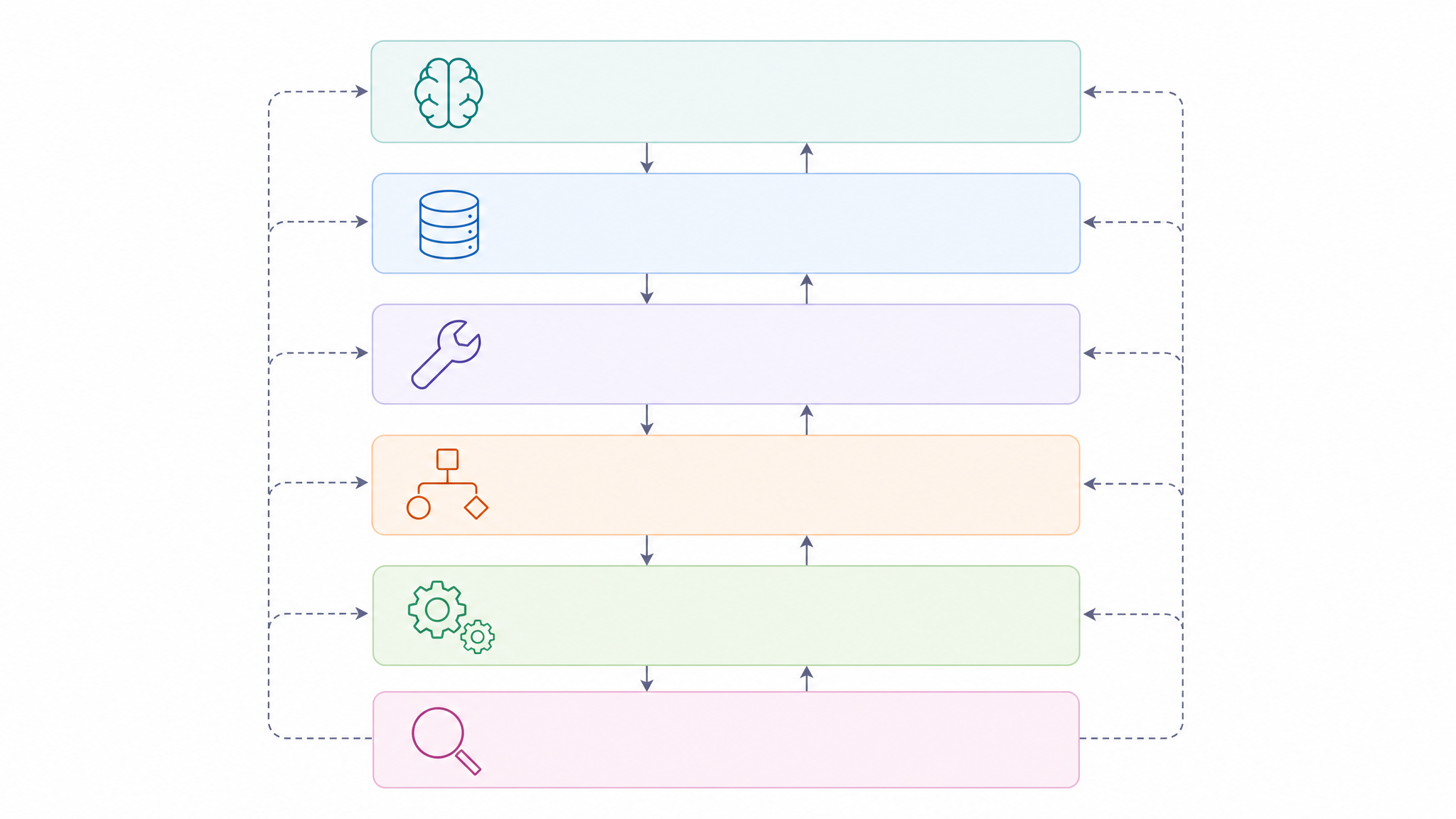
Every production agent has six architectural layers. Skip one and your system will eventually fail in ways that are hard to debug.
[DIAGRAM: Six-layer architecture — Model Core → Memory → Tools → Planner → Runtime → Observability]
1. Model Core (Reasoning Engine)
This is the brain. In 2026, your choices fall into three tiers:
- Frontier hosted models: GPT-5, Claude Opus 4.7, Gemini 3.x — best reasoning, highest cost per call
- Open-source frontier-class: Llama 4.x, DeepSeek-V3.x, Qwen3 — served on vLLM, TGI, or SGLang
- Smaller dedicated agent models: Mid-size models fine-tuned for tool use and structured JSON output
What matters for agents isn’t just raw intelligence — it’s tool-use accuracy, context window length, and reasoning chain stability. A model that drifts after 5 tool calls will make your agent unreliable regardless of its benchmark scores.
Cost per token drives another key decision: many production systems use a frontier model as the planner and a cheaper model as the executor, reducing cost by 3-5x without sacrificing quality.
2. Memory System
Memory in production agents is not “stuff everything into a vector database.” It’s four distinct layers:
| Layer | What It Stores | Where | When It Expires |
|---|---|---|---|
| Working memory | Current task context, partial plan, extracted constraints | In the prompt/state | End of turn |
| Conversation memory | Rolling summary + last N turns | Vector store + structured table | End of session or TTL |
| Task artifacts | Generated files, decisions made, PR links, commands executed | Structured storage (DB, object store) | Explicit deletion |
| Long-term preferences | User preferences, org policies, learned procedures | Dedicated memory layer (Mem0, Letta, Zep) | Explicit removal only |
The most common mistake: treating vector retrieval as your only memory strategy. Vector search is great for document context and long-conversation recall. It’s terrible for critical facts (use a database), permissions (use config), and financial data (never store it in embeddings).
3. Tool and Plugin Layer
Tools turn a text generator into an action engine. In 2026, the mature patterns are:
- Typed function calls with JSON Schema or Pydantic validation — the agent fills in arguments, the runtime validates before calling
- MCP (Model Context Protocol) servers — Anthropic’s open standard for portable tool catalogs, now widely adopted
- Code execution sandboxes — E2B, Modal, Daytona, or self-hosted interpreters
- Web search and retrieval — Tavily, Brave, Exa, plus enterprise indexes
Three rules that prevent most tool-related defects:
- Type and validate every tool argument before the call leaves the agent
- Return structured errors, not raw exception traces — the agent will try to recover
- Make side effects idempotent by default — require an explicit idempotency key for operations like payments or email sends
A robust tool result envelope looks like this:
{
  "ok": true,
  "data": { "userId": "u_123", "plan": "pro" },
  "error": null,
  "meta": { "tool": "getUser", "durationMs": 82, "cacheHit": true }
}
That meta field becomes gold for evaluation and debugging later.
4. Planner and Reasoning Layer
The planner decomposes a goal into a sequence of actions. Five patterns dominate in 2026:
| Pattern | How It Works | Best For | Tradeoff |
|---|---|---|---|
| ReAct | Interleave Thought → Action → Observation in a single loop | Simple tool-use agents | Can drift on long chains |
| Plan-and-Execute | Planner creates full step list upfront, executor runs each step | Goals decomposable upfront | Weak when environment changes mid-task |
| Reflexion | Agent runs task, scores outcome, writes critique, retries with critique | Long-horizon tasks with recoverable failures | More expensive per task |
| Tree-of-Thoughts | Expand multiple reasoning paths in parallel, score, backtrack | Search-heavy problems | Highest cost per task |
| Multi-Agent | Specialized agents collaborate (planner-executor, supervisor-worker, maker-checker) | Complex workflows needing diverse expertise | Most complex to debug |
Most production systems start with ReAct and graduate to Plan-and-Execute or Multi-Agent as complexity grows. Our Multi-Agent Systems guide covers orchestration patterns in depth.
5. Orchestration Runtime
The runtime owns state, retries, checkpoints, and handoffs. The mainstream options in 2026:
- LangGraph — Graph-based state machine with durable checkpoints and human-in-the-loop breakpoints. Best for complex, multi-step workflows.
- CrewAI — Role-based crews with hierarchical processes and flows. Best for teams of specialized agents.
- OpenAI Agents SDK — Successor to Swarm, with handoffs and built-in guardrails. Best for OpenAI-centric stacks.
- Microsoft Agent Framework — Unified runtime building on Semantic Kernel and AutoGen concepts. Best for enterprise .NET/Azure stacks.
Choose based on your stack, not hype. LangGraph wins for Python-first teams needing fine-grained control. CrewAI wins for rapid prototyping with role-based agents. The OpenAI SDK wins if you’re all-in on OpenAI models.
6. Observability and Evaluation
If you can’t observe it, you can’t fix it. Production agents need:
- OpenTelemetry-compatible tracing — Every tool call, memory retrieval, and state transition becomes a span
- Span-level evaluation — Score each step, not just the final answer. Did the agent pick the right tool? Were the arguments correct? Did it follow the plan?
- Guardrails — Policy-as-code boundaries that block dangerous actions before they execute
- Human-in-the-loop approvals — For irreversible actions like payments, deletions, or external API calls
The observability layer is also where you catch the most insidious agent failure: the infinite loop. Without trace-level visibility, an agent stuck calling the same tool repeatedly looks like “it’s just slow.”
Memory: Not Just a Vector DB
Let’s zoom in on memory, since it’s the component most teams get wrong.
The Four-Layer Model in Practice
Working memory is what the agent is actively thinking about — extracted constraints, a partial plan, intermediate tool results. Store it in state, not in the prompt. When you stuff everything into the context window, you get bloated prompts, higher costs, and degraded reasoning.
Conversation memory should be a rolling summary plus the last N turns. Don’t keep infinite chat logs. Summaries should be lossy by design but consistent — the same information condensed the same way every time.
Task artifacts are everything the agent produces: generated files, decisions, PR links, commands executed. This is best stored as structured records, not embeddings. You need exact retrieval, not fuzzy matching.
Long-term preferences are stable facts about a user or organization: “uses TypeScript + Next.js,” “prefers technical deep dives,” “never deploy on Fridays.” These deserve explicit consent, scope boundaries, and expiration policies.
When Vector Search Actually Fits
Vector retrieval is great for document context and long-conversation recall. It’s not great for critical facts (use a database), permissions (use config), or financial data (never). The production pattern is a hybrid: vector search for fuzzy retrieval, structured queries for exact facts, and a rules engine for policies.
Tools: Treat Them Like API Contracts
The biggest source of agent failures isn’t the model — it’s the tool layer. Here’s how to make tools reliable:
The Tool Contract Checklist
- Every tool has a typed schema — JSON Schema, Zod, or Pydantic. No stringly-typed arguments.
- Validate before calling — The runtime rejects invalid arguments before the model’s request reaches your function.
- Return structured results —
{ ok, data, error, meta }format. Never throw raw exceptions at the agent. - Make side effects idempotent — Require an
idempotencyKeyfor operations that can’t be safely retried. - Budget every call — Set
timeout,maxRetries, andmaxCostfor each tool. No unbounded operations.
MCP: The Emerging Standard
The Model Context Protocol (MCP) is becoming the standard for tool integration. Instead of writing custom tool wrappers for every LLM provider, you define tools once as MCP servers and any compliant agent can use them. This is especially valuable in multi-agent setups where different agents need access to the same tool catalog.
Planning Patterns: From ReAct to Multi-Agent
Choosing the right planning pattern is one of the most impactful architectural decisions. Here’s a practical guide:
Start with ReAct
For most agents, ReAct (Reason + Act) is the safe default. The agent thinks, acts, and observes in a loop. It’s simple, debuggable, and handles most tool-use scenarios well.
Graduate to Plan-and-Execute
When your tasks get complex enough that the agent needs to think ahead, switch to Plan-and-Execute. A separate planner creates the step list, and an executor runs each step. This pattern shines when the goal can be decomposed upfront but struggles when the environment changes mid-task.
Multi-Agent for True Complexity
When a single agent can’t handle the breadth of a task, use multiple specialized agents. The common patterns are:
- Planner-Executor: One agent plans, another executes
- Supervisor-Worker: A supervisor delegates tasks to specialized workers
- Maker-Checker: One agent creates, another validates
Our Multi-Agent Systems guide covers these patterns with architecture diagrams and framework comparisons.
Guardrails and Safety
Security isn’t an afterthought for agents — it’s a core architectural component. Agents with tool access can do real damage.
Policy-as-Code
Define what the agent is allowed to do in code, not in prompts:
- Allowlists for tools: “This agent can call
searchDocsandcreateTicketbut notdeleteUser“ - Approval gates for irreversible actions: “Any action affecting production systems requires human approval”
- Scope boundaries: “This agent operates only within the
customer-supportdomain”
Prompt Injection Defense
Agents are vulnerable to prompt injection through user input, tool responses, and even retrieved documents. Defense-in-depth means:
- Separate instructions from data — Never concatenate user input directly into the system prompt
- Validate tool outputs — Don’t trust external data without sanitization
- Monitor for anomalous behavior — Tracing helps detect when an agent starts acting outside its intended scope
For a deeper treatment of agent security, our upcoming Security & Guardrails for AI Agents guide covers attack vectors, defense patterns, and compliance frameworks.
Human-in-the-Loop
For actions that can’t be undone — payments, deletions, infrastructure changes — require explicit human approval. The pattern is straightforward: the agent pauses, sends a request to a human approver, and waits for consent before proceeding.
Observability: You Can’t Fix What You Can’t See
Agent debugging is fundamentally different from traditional debugging. You’re not stepping through deterministic code — you’re tracing a probabilistic system that makes decisions based on context.
OpenTelemetry for Agents
The emerging standard is OpenTelemetry-compatible tracing. Every agent action becomes a span:
agent.loop.iteration— One cycle of the agent loopagent.tool.call— A tool invocation with inputs and outputsagent.memory.retrieve— A memory lookupagent.planner.step— A planning decision
With these spans, you can answer questions like: “Why did the agent call sendEmail three times?” or “Where did the context window get filled up?”
Evaluation: Test Trajectories, Not Just Answers
Single-turn evals (“did it give the right answer?”) don’t work for agents. You need to evaluate the entire trajectory:
- Tool selection accuracy — Did it pick the right tool?
- Argument correctness — Were the tool arguments valid and complete?
- Plan adherence — Did it follow the plan, or did it drift?
- Recovery from errors — When a tool failed, did it recover gracefully?
Putting It All Together: A Build Order
Don’t build all six layers at once. Here’s the recommended sequence for production agents:
- Week 1: Model + Tools — Pick a model, define your tool schemas, build the basic ReAct loop. Validate that the agent can call tools correctly.
- Week 2: Memory + State — Add working memory and conversation memory. Implement a proper state machine instead of appending to chat history.
- Week 3: Guardrails + Human Approval — Add policy-as-code, approval gates for dangerous actions, and basic prompt injection defenses.
- Week 4: Observability + Eval — Instrument with OpenTelemetry. Build trajectory evals. Set up alerting on anomalous behavior.
- Week 5+: Advanced Patterns — Upgrade to Plan-and-Execute or Multi-Agent as complexity demands. Add episodic memory and procedural learning.
This incremental approach ensures you always have a working system, and each layer makes it more reliable.
FAQ
What’s the difference between an AI agent and a chatbot?
A chatbot follows a fixed conversation tree or intent classifier. An agent reasons about what to do next, takes actions through tools, and adapts when things change. Agents have memory, planning, and the ability to operate autonomously within defined boundaries. Chatbots respond; agents act.
Which planning pattern should I start with?
Start with ReAct (Reason + Act). It’s the simplest pattern, easy to debug, and handles most tool-use scenarios. Graduate to Plan-and-Execute when tasks get complex enough to require upfront decomposition, and to Multi-Agent when you need specialized expertise in different domains.
How do I prevent my agent from looping infinitely?
Three mechanisms: budget enforcement (set a maximum number of iterations and cost per task), trace-level observability (monitor each step for repeated tool calls), and state validation (if the agent’s state hasn’t changed meaningfully in N steps, terminate with a clear error).
Do I really need a vector database for agent memory?
Not for most production agents. You need four distinct layers of memory (working, conversation, task artifacts, long-term preferences), and only one of those layers benefits from vector retrieval. Start with structured storage and add vector search only when you need fuzzy retrieval over documents or long conversations.
What’s MCP and should I use it?
MCP (Model Context Protocol) is an open standard by Anthropic for defining portable tool catalogs. Instead of writing custom tool wrappers for every LLM provider, you define tools once as MCP servers and any compliant agent can use them. If you’re building multi-agent systems or switching between LLM providers, MCP eliminates significant integration overhead.
How do I evaluate an agent in production?
Evaluate the full trajectory, not just the final answer. Track four dimensions: tool selection accuracy (did it pick the right tool?), argument correctness (were inputs valid?), plan adherence (did it follow the plan?), and error recovery (did it handle failures gracefully?). Use OpenTelemetry spans to instrument each dimension and set up automated scoring.
Conclusion
Building a production AI agent means building a distributed system where the LLM happens to be the planner and executor. The six core components — model, memory, tools, planner, runtime, and observability — aren’t optional. Skip one and you’ll spend weekends debugging failures that tracing would have caught in minutes.
The good news: the patterns are stabilizing. ReAct, Plan-and-Execute, and Multi-Agent orchestration are well-understood. Typed tools, structured memory, and OpenTelemetry tracing are becoming defaults. The build order is clear: start simple, add complexity incrementally, and instrument everything from day one.
Ready to build your first production agent? Explore our AI Agent Fundamentals guide for the foundational concepts, or see how multi-agent systems work in practice when single agents aren’t enough.