One AI agent is impressive. Two agents working together can solve problems neither could handle alone. But when you orchestrate five, ten, or fifty agents — each with specialized roles, shared memory, and coordinated workflows — you get something fundamentally different: a system that doesn’t just assist, but collaborates.
In early 2025, most teams were experimenting with single agents: a chatbot here, a coding assistant there. By mid-2026, the conversation shifted. OpenAI’s Codex runs multiple agents in parallel. Microsoft is building a “super app” that unifies its Copilot agents. CrewAI, AutoGen, and LangGraph have matured from research projects into production-ready frameworks.
The shift from single-agent to multi-agent isn’t incremental. It’s the difference between hiring one freelancer and building a department. This guide explains how multi-agent systems actually work — the architecture patterns, communication protocols, orchestration strategies, and frameworks that make them function — so you can decide when, why, and how to build one.
What Are Multi-Agent Systems?
A multi-agent system (MAS) is a group of AI agents that work together to solve problems that are too complex, too large, or too varied for a single agent to handle effectively.
Each agent in the system has:
- A role — what it’s responsible for (researcher, writer, reviewer, coordinator)
- A goal — what it’s trying to achieve (find relevant papers, write a summary, verify facts)
- Tools — what it can do (web search, code execution, file access, API calls)
- Memory — what it remembers (past interactions, shared context, corrections)
The key insight: agents in a MAS are specialized, not general. A researcher agent shouldn’t write final copy. A fact-checker shouldn’t brainstorm ideas. Each agent does one thing well, and the system orchestrates their collaboration.
This mirrors how human teams work. You wouldn’t hire one person to research, write, edit, fact-check, and publish a report. You’d hire specialists and coordinate their work. Multi-agent systems apply the same principle to AI.
Why Single Agents Hit a Wall
Single agents work well for focused tasks. But they struggle when a problem requires:
- Multiple perspectives — A coding agent isn’t great at writing documentation. A research agent can’t review its own accuracy.
- Sequential dependencies — Task B needs Task A’s output. Without coordination, the agent either guesses or stops.
- Quality control — An agent that generates content can’t reliably critique its own work. Self-review creates bias blind spots.
- Scale — Processing 1000 documents, monitoring 50 data streams, or running 20 parallel analyses exceeds what one agent can handle within time and token limits.
The pattern is clear: single agents work for single-domain tasks. When you cross domains, need oversight, or operate at scale — you need multiple agents working together.
Core Architecture Patterns
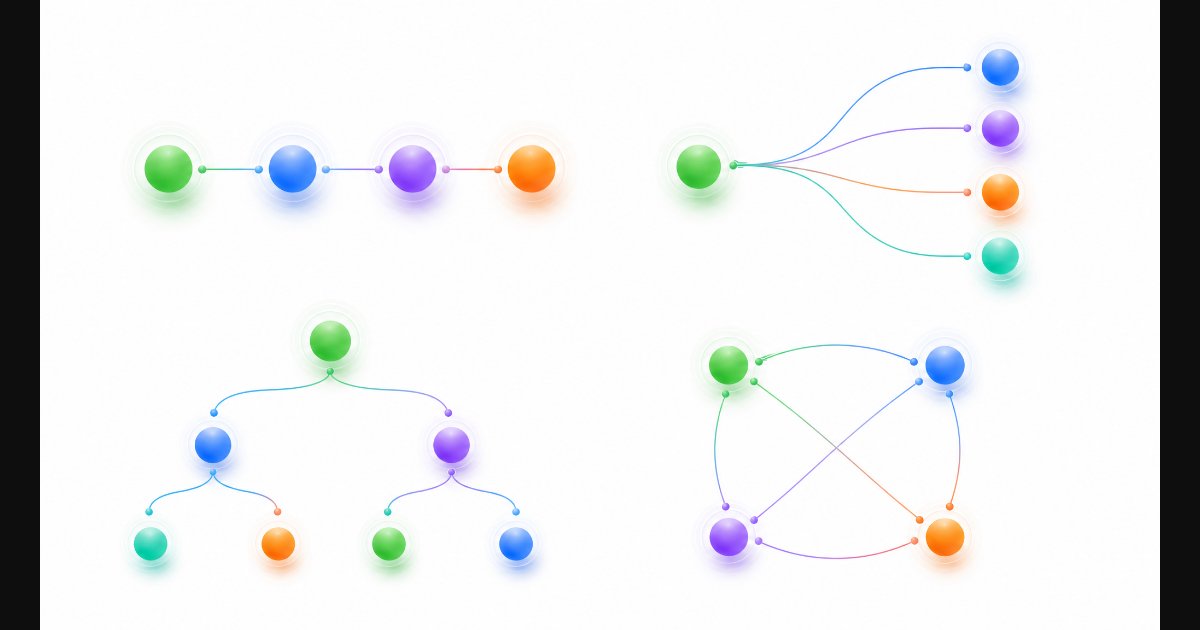
Every multi-agent system falls into one of four architecture patterns. Understanding these is the foundation for everything that follows.
1. Sequential Pipeline
The simplest pattern. Agents work one after another, each building on the previous agent’s output.
When to use: Linear workflows where each step has clear inputs and outputs. Content creation, data processing pipelines, document workflows.
Strengths: Easy to implement, easy to debug, predictable.
Weaknesses: Slow (agents wait for each other), single point of failure, no parallelism.
2. Parallel Fan-Out
One coordinator sends tasks to multiple agents simultaneously, then aggregates results.
When to use: Research tasks, data analysis from multiple sources, any task where independent sub-problems can be solved simultaneously.
Strengths: Fast (agents work in parallel), resilient (one failure doesn’t stop others).
Weaknesses: Requires result aggregation, coordination overhead, potential for contradictory outputs.
3. Hierarchical
A manager agent delegates tasks to worker agents, reviews their output, and makes final decisions.
When to use: Complex workflows requiring judgment, task prioritization, or quality gates. Enterprise automation, decision support systems.
Strengths: Clear chain of command, quality control at the manager level, handles ambiguity well.
Weaknesses: Manager is a bottleneck, single point of failure if manager fails, overhead cost.
4. Mesh / Peer-to-Peer
Agents communicate directly with each other without a central coordinator. Each agent decides who to talk to based on its needs.
When to use: Dynamic environments where the flow of information isn’t predictable. Brainstorming, collaborative problem-solving, emergent behavior scenarios.
Strengths: No single point of failure, highly adaptive, supports emergent solutions.
Weaknesses: Hard to debug, unpredictable execution paths, potential for infinite loops or deadlocks.
Which Pattern to Choose?
| Pattern | Best For | Complexity | Debugging |
|---|---|---|---|
| Sequential | Linear, predictable workflows | Low | Easy |
| Parallel | Independent sub-tasks, speed-critical | Medium | Medium |
| Hierarchical | Complex, judgment-heavy workflows | Medium-High | Medium |
| Mesh | Dynamic, creative, exploratory tasks | High | Hard |
Start with sequential. Move to parallel when speed matters. Add hierarchy when you need quality control. Use mesh only when you need emergent behavior and can tolerate unpredictability.
Communication Protocols: How Agents Talk
Agents need to share information. How they communicate is as important as what they communicate.
Direct Messaging
Agent A sends a message directly to Agent B. Simple, explicit, easy to trace.
researcher.send(message="Found 5 relevant papers", recipient=writer)
Used in: CrewAI (via task handoff), AutoGen (via chat), most frameworks.
Shared Memory / Blackboard
Agents write to and read from a shared workspace. Think of it as a whiteboard everyone can see.
shared_memory.write("research_results", data)
writer_prompt = shared_memory.read("research_results")
Used in: LangGraph (via state), CrewAI (via memory), custom implementations.
Event-Driven
Agents publish events to a bus. Other agents subscribe to events they care about.
events.publish("document_uploaded", payload)
reviewer.subscribe("document_uploaded", handler)
Used in: Enterprise systems, real-time monitoring, microservice-style architectures.
Choosing a Protocol
| Protocol | Best When | Trade-off |
|---|---|---|
| Direct messaging | Clear sender/receiver, linear flow | Tight coupling |
| Shared memory | Multiple agents need same context | Memory bloat, stale reads |
| Event-driven | Dynamic, loosely-coupled systems | Complexity, debugging difficulty |
In practice, most production systems combine these. A hierarchical system uses direct messaging for task delegation and shared memory for context.
Orchestration Patterns
Orchestration is how the system decides what happens next. It’s the difference between agents running randomly and agents executing a coordinated plan.
Fixed Workflow (Deterministic)
The sequence is predefined. Step 1, Step 2, Step 3. No deviation.
research → outline → draft → review → publish
Best for: Repeatable processes, compliance-heavy workflows, predictable tasks.
Dynamic Routing (Conditional)
The orchestrator decides the next step based on the output of the previous one.
if research.confidence > 0.8:
    → draft
else:
    → deeper_research
Best for: Tasks where quality varies, error handling, adaptive workflows.
Self-Organizing (Emergent)
Agents negotiate among themselves. The manager (if any) sets goals, not steps.
manager: "Produce a competitive analysis of AI coding tools"
agents self-organize: who researches, who writes, who reviews
Best for: Creative tasks, research, brainstorming — where the process can’t be fully specified in advance.
Error Handling Patterns
- Retry with escalation: Agent fails → retry → escalate to manager → fallback
- Circuit breaker: If an agent fails 3 times, skip it and route around
- Human-in-the-loop: When confidence is low, pause and ask for human input
Frameworks Compared: CrewAI vs AutoGen vs LangGraph
Three frameworks dominate the multi-agent landscape in 2026. Here’s how they actually differ.
CrewAI — Role-Based Collaboration
Philosophy: Agents are crew members with roles, goals, and backstories. You define who each agent is, and they figure out how to work together.
from crewai import Agent, Task, Crew

researcher = Agent(
    role="Senior Research Analyst",
    goal="Find and analyze relevant information",
    backstory="Expert at synthesizing complex data",
    tools=[search_tool, scrape_tool]
)

writer = Agent(
    role="Technical Writer",
    goal="Transform research into clear, engaging content",
    backstory="Former journalist with deep tech knowledge",
)

research_task = Task(description="Research AI agent frameworks", agent=researcher)
write_task = Task(description="Write a comparison article", agent=writer)

crew = Crew(agents=[researcher, writer], tasks=[research_task, write_task])
result = crew.kickoff()
Strengths:
– Intuitive role-based design (feels like managing a real team)
– Built-in memory and context sharing
– Enterprise features: Visual Agent Builder, guardrails, monitoring
– Human-in-the-loop support
Weaknesses:
– Less flexible for non-role-based workflows
– Overhead for simple sequential tasks
– Enterprise features require paid plan
Best for: Content teams, research workflows, any task that maps naturally to “roles on a team.”
AutoGen (Microsoft) — Conversation-Driven
Philosophy: Agents communicate through conversations. Multi-agent = multi-party chat where agents respond to each other.
from autogen import AssistantAgent, UserProxyAgent

researcher = AssistantAgent("researcher", llm_config=config)
writer = AssistantAgent("writer", llm_config=config)
user = UserProxyAgent("user", code_execution_config=False)

group_chat = GroupChat(
    agents=[user, researcher, writer],
    messages=[],
    max_round=10
)
manager = GroupChatManager(groupchat=group_chat, llm_config=config)
user.initiate_chat(manager, message="Write a report on AI agent frameworks")
Strengths:
– Natural conversation flow — agents literally chat with each other
– Built-in human proxy for human-in-the-loop
– Strong code execution support
– Microsoft backing, Azure integration
Weaknesses:
– Conversational overhead can slow down simple tasks
– Hard to predict execution order
– Less structured than CrewAI for deterministic workflows
– Debugging multi-party conversations is challenging
Best for: Collaborative problem-solving, code generation, research where agents need to iterate and debate.
LangGraph — Graph-Based Control
Philosophy: Agents are nodes in a directed graph. Edges define the flow. You control everything — every transition, every condition, every state change.
from langgraph.graph import StateGraph, END

def research(state):
    # Research logic
    return {"findings": results}

def should_continue(state):
    if state["confidence"] > 0.8:
        return "write"
    return "research"

graph = StateGraph(AgentState)
graph.add_node("researcher", research)
graph.add_node("writer", write)
graph.add_conditional_edges("researcher", should_continue)
graph.add_edge("writer", END)

app = graph.compile()
result = app.invoke({"topic": "AI agent frameworks"})
Strengths:
– Maximum control over execution flow
– Explicit state management — you see exactly what each agent receives
– Cycles and conditional routing built-in
– Excellent for complex, non-linear workflows
– Strong debugging and visualization tools
Weaknesses:
– Steeper learning curve — you define everything
– More code for simple workflows
– Requires understanding of graph theory concepts
– Less “magic” — you must handle orchestration yourself
Best for: Complex production workflows, compliance-heavy processes, any system where you need precise control over agent execution.
Quick Comparison
| Feature | CrewAI | AutoGen | LangGraph |
|---|---|---|---|
| Design philosophy | Role-based teams | Conversational | Graph-based control |
| Learning curve | Low | Low-Medium | Medium-High |
| Control level | Medium | Low-Medium | High |
| Best for | Content, research | Collaboration, coding | Production workflows |
| Human-in-the-loop | ✅ | ✅ | ✅ |
| Memory | Built-in | Per-session | State-based |
| Enterprise features | ✅ (paid) | Azure integration | LangSmith monitoring |
| Open source | ✅ | ✅ | ✅ |
| Debugging | Good | Challenging | Excellent |
Implementation Walkthrough: Building a Multi-Agent Research Team
Let’s build a practical example: a multi-agent system that researches a topic, writes a report, and fact-checks it. We’ll use CrewAI for clarity.
Step 1: Define Your Agents
researcher = Agent(
    role="Senior Research Analyst",
    goal="Find and synthesize relevant, accurate information on the given topic",
    backstory="You're an experienced analyst who excels at identifying key insights from large volumes of data. You prioritize accuracy and always cite your sources.",
    tools=[search_tool, scrape_tool],
    verbose=True
)

writer = Agent(
    role="Technical Writer",
    goal="Transform research into clear, well-structured content that informs and engages",
    backstory="You're a former tech journalist who writes compelling content without sacrificing accuracy. You organize complex information into digestible sections.",
    verbose=True
)

fact_checker = Agent(
    role="Fact Checker",
    goal="Verify claims, check statistics, and flag any inaccuracies or unsupported statements",
    backstory="You have an eagle eye for errors. You double-check every claim, every statistic, and every quote. If something can't be verified, you flag it.",
    tools=[search_tool],
    verbose=True
)
Step 2: Define Tasks
research_task = Task(
    description="Research {topic}. Find 5-7 key sources, identify main arguments, and extract supporting data. Output a structured research brief.",
    expected_output="A research brief with key findings, sources, and data points",
    agent=researcher
)

writing_task = Task(
    description="Using the research brief, write a comprehensive article on {topic}. Include an introduction, 3-4 main sections, and a conclusion with actionable takeaways.",
    expected_output="A well-structured article of 1500-2000 words",
    agent=writer
)

fact_check_task = Task(
    description="Review the article for factual accuracy. Verify all claims, statistics, and quotes. Flag any unverifiable statements and suggest corrections.",
    expected_output="A verified article with corrections applied and accuracy score",
    agent=fact_checker
)
Step 3: Orchestrate
crew = Crew(
    agents=[researcher, writer, fact_checker],
    tasks=[research_task, writing_task, fact_check_task],
    process=Process.sequential,  # Run in order: research → write → verify
    verbose=True
)

result = crew.kickoff(inputs={"topic": "Multi-Agent AI Systems in 2026"})
This is a sequential pipeline — the simplest pattern. But what if you want the researcher and fact-checker to run in parallel after the initial draft? That’s where you’d switch to a hierarchical process with a manager agent, or use LangGraph for conditional routing.
Key Takeaways from This Implementation
- Start with roles, not tech — Define what each agent does before choosing a framework
- One agent, one job — Don’t make a “researcher-writer-reviewer” super-agent
- Explicit task descriptions — The more specific your task, the better the output
- Sequential first — Get it working linearly, then add parallelism and conditions
- Always add verification — A fact-checker or review agent catches what generators miss
Common Pitfalls & How to Avoid Them
1. Agent Sprawl
Problem: Adding more agents hoping it improves output, but each additional agent adds coordination overhead, token cost, and potential for conflicting instructions.
Fix: Start with 2-3 agents. Add more only when you can articulate why the current agents can’t handle the task.
2. The Telephone Game
Problem: Information degrades as it passes through multiple agents. Agent D receives a corrupted version of what Agent A originally produced.
Fix: Use shared memory (not just message passing) so every agent can access the original source. Keep context windows lean — summarize, don’t copy-paste.
3. Infinite Loops
Problem: Agent A sends to B, B sends back to A, A sends to B again… especially in conversational frameworks.
Fix: Set max_iterations on every agent. Add circuit breakers that terminate after N rounds. Monitor execution graphs for cycles.
4. Token Explosion
Problem: Each agent consumes tokens. Five agents each processing 4K context = 20K tokens per cycle. With retries and iterations, costs multiply fast.
Fix: Give agents minimal context — only what they need for their specific task. Use summarization between steps. Cache results to avoid re-processing.
5. Debugging Black Boxes
Problem: When Agent C produces wrong output, it’s hard to trace whether the issue was Agent A’s research, Agent B’s summary, or Agent C’s own reasoning.
Fix: Enable verbose logging. Use frameworks with built-in tracing (LangGraph, LangSmith). Store each agent’s input/output for post-mortem analysis.
When to Use Multi-Agent (And When Not To)
Use Multi-Agent When:
- The task spans multiple domains — research + writing + fact-checking, coding + testing + documentation
- Quality requires independent verification — one agent generates, another reviews
- Speed matters — parallel agents finish faster than a single agent doing everything sequentially
- The task is too complex for one context window — split the work across specialized agents
- You need resilience — if one agent fails, others can continue
Don’t Use Multi-Agent When:
- A single agent can handle the task — Don’t add complexity for its own sake
- The workflow is simple and linear — One prompt chain beats five agents for straightforward tasks
- You’re optimizing for cost — Multi-agent costs 3-10x more than single-agent for the same task
- Latency is critical — Coordination overhead adds 2-5 seconds per agent transition
- You can’t define clear agent roles — If you can’t articulate what each agent does, you’re not ready for MAS
The Future of Multi-Agent Systems
Three trends are shaping what comes next:
1. Self-Organizing Agents
Current MAS requires you to define roles and workflows manually. The next generation will let you specify a goal, and agents will self-organize — determining their own roles, communication patterns, and execution order.
Early examples: AutoGen’s GroupChat with dynamic speaker selection, CrewAI’s planned “adaptive crews.”
2. Agent Marketplaces
Instead of building every agent from scratch, you’ll compose systems from pre-built, specialized agents — like assembling a team from a talent pool.
OpenAI’s plugin ecosystem (90+ integrations for Codex) is a preview. The future: an agent marketplace where you can find, test, and deploy specialized agents for specific tasks.
3. Persistent Multi-Agent Systems
Today’s agents are ephemeral — they exist for one task and disappear. The future: persistent agent teams that maintain state, learn from past interactions, and improve over time.
This requires robust memory (which Codex is building), shared context (which LangGraph’s state management enables), and governance (who decides when an agent’s behavior needs correction).
Conclusion
Multi-agent systems aren’t a buzzword — they’re the natural evolution of AI from individual tools to collaborative teams. The shift mirrors how organizations work: specialists coordinated toward a common goal.
Start simple: 2-3 agents in a sequential pipeline. Measure the results. Add complexity (parallelism, hierarchy, conditional routing) only when the simpler approach can’t meet your needs.
The frameworks are ready. CrewAI for role-based teams, AutoGen for conversational workflows, LangGraph for precise control. Pick based on your problem, not your preference.
And if you’re evaluating where multi-agent fits in your organization, start with a workflow audit. Find the processes that already involve multiple people, multiple tools, and multiple steps — those are your best candidates for multi-agent automation.
Ready to build your first multi-agent system? 👉 Explore AI agent solutions on Agoobi — frameworks, patterns, and implementation guides for teams deploying AI agents.
Frequently Asked Questions
What is the difference between a multi-agent system and a single agent with multiple tools?
A single agent with tools uses different capabilities (search, code execution, file access) but makes all decisions itself. It’s one entity switching between tools. A multi-agent system distributes decision-making across multiple specialized agents, each with its own role, goal, and reasoning. The key difference is autonomy: in a MAS, agents make independent decisions about their domain. In a single-agent setup, one agent decides everything, just using different tools for different steps.
Which framework should I start with for my first multi-agent project?
Start with CrewAI if you’re new to multi-agent systems. Its role-based design maps naturally to how you’d organize a human team — define roles, give each agent a clear goal, and let them work. The learning curve is the lowest, and the framework handles orchestration for you. Once you need more control over execution flow (conditional routing, loops, complex state), graduate to LangGraph. Skip AutoGen unless you specifically need conversational agent interactions or deep Azure integration.
How much does a multi-agent system cost compared to a single agent?
Multi-agent systems typically cost 3-10x more than single-agent approaches for the same task, because each agent consumes tokens independently. A single agent processing a 4K context window uses ~4K tokens. A three-agent system where each agent processes its own 4K context uses ~12K tokens per cycle. However, multi-agent often produces better quality output (especially with a verification/review agent), which can justify the cost. Optimize by giving agents minimal context and caching results between steps.
Can multi-agent systems work without a central orchestrator?
Yes — this is the mesh/peer-to-peer pattern. Agents communicate directly with each other, deciding who to talk to based on their needs. AutoGen’s GroupChat is an example: agents participate in a group conversation and decide when to respond. However, orchestrator-less systems are harder to debug, harder to predict, and more prone to infinite loops. For production systems, most teams use at least a lightweight coordinator (hierarchical pattern) even when agents have significant autonomy.
How do I prevent agents from going into infinite loops?
Three strategies: (1) Set max_iterations on every agent — hard limit that forces termination. (2) Use circuit breakers — if an agent fails or loops N times, route around it. (3) Monitor execution graphs — frameworks like LangGraph provide visualization tools that show exactly which agent is running and what state the system is in. Additionally, use sequential patterns for critical workflows (they can’t loop by design) and reserve mesh patterns for creative/exploratory tasks where some unpredictability is acceptable.
What’s the minimum number of agents needed for a useful multi-agent system?
Two — one generator and one verifier. This is the simplest useful multi-agent pattern: Agent A produces output, Agent B reviews and either approves or sends it back with feedback. This pattern alone catches errors, reduces hallucinations, and improves output quality significantly compared to a single agent. Add a third agent (researcher) when the generator needs external input. Add a fourth (coordinator) when the workflow becomes complex enough to need orchestration.
Ready to build your own multi-agent system? Agoobi helps businesses design, deploy, and optimize AI agent teams — from architecture design to production deployment. Book a consultation to explore which multi-agent pattern fits your use case.
Continue reading:
- AI Coding Agents in 2026 — how autonomous coding agents are transforming software development
- DeepSeek and Its Impact on AI Stocks — the cost revolution making AI agents affordable