No-Code AI Automation: A Guide for Business Teams
You do marketing, sales, or operations — not dev. But you want to use AI to automate work. No need to write code, no need to understand Python, no need to wait for a technical team. No-code AI automation is the answer.
This article guides you from A to Z: what is no-code AI automation, why business teams need it, how to choose tools, and a practical implementation roadmap.
What Is No-Code AI Automation?
No-code AI automation is a method of using AI platforms to build automated processes without writing code. Instead of hiring a developer or learning to program yourself, you drag-drop, configure, and run — just like using Excel instead of writing software.
Unlike traditional automation (Zapier, Make only connect apps), no-code AI agents are possible thinking, analysis, and decision making — don’t just run hard scripts.
Real-life example:
- Categorize customer emails automatically prioritized by AI
- Create weekly report from raw data in 30 seconds instead of 2 hours
- Basic chat reply on the website without the need for on-duty staff
- Check data quality before importing into CRM
Why Do Business Teams Need No-Code AI?
Old Problem: Waiting for Dev, Waiting for Budget, Waiting…
Business teams often encounter this cycle:
- Manual process detection is time consuming
- Write a request for the technical team
- Waiting for prioritization, waiting for sprint, waiting for deployment
- When received back — needs to be fixed because the spec is not correct
- Repeat from the beginning
Result: a simple workflow takes 2-6 weeks. Meanwhile, you’re still doing it manually every day.
Solution: Do It Yourself, Fast, No Code Required
With AI tools for business no-code style, you build your own workflow in the morning, test it in the afternoon, and fine-tune during the week. No need for Jira tickets, no need for approval from CTO.
Notable figures: According to McKinsey (2024), organizations that enable business users to automate with no-code tools achieve ROI 3x faster than groups that rely entirely on IT.
3 Core Benefits
| Benefits | Details |
|---|---|
| Speed | From idea → production in days, not months |
| Control | Business understands the process best — self-configuration is more accurate than dev spec |
| Cost | No engineering resources — a no-code tool license is cheaper than a dev day |
4 Popular No-Code AI Automation Models
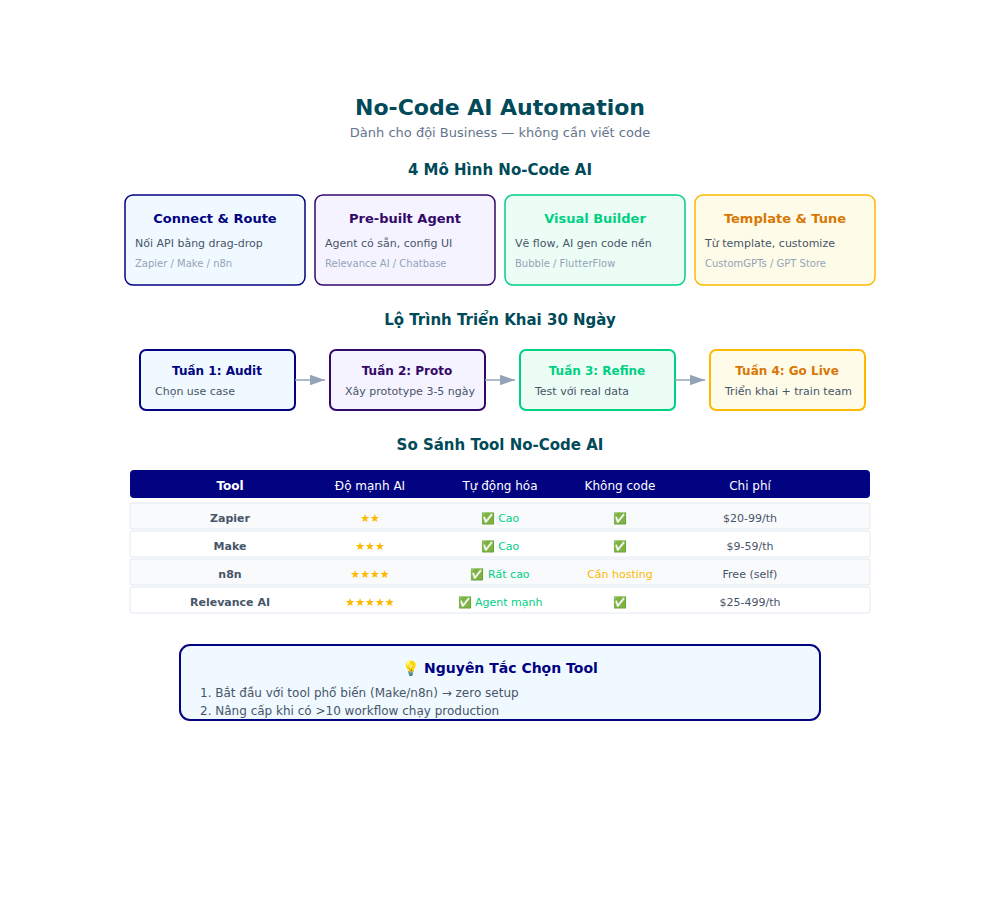
1. AI Chatbot for Customer Support
How it works: AI reads customer questions → understands → automatically answers or passes them to staff when needed.
Popular tools: Chatbase, Voiceflow, Botpress
When to use: When the support team is overloaded with repetitive questions (FAQ, tracking orders, policies).
2. AI Workflow for Data Processing
How it works: AI receives raw data (CSV, email, form) → processes, classifies, enriches → outputs results.
Popular tools: Relay, Relevance AI, Flowise
When to use: When you process data repeatedly — lead scoring, data cleansing, report generation.
3. AI Agents for Research & Analysis
How it works: AI searches the web, reads documents, synthesizes insights and produces reports.
Popular tools: CrewAI (no-code version), Gumloop, Wordware
When to use: When needing competitive analysis, market research, or summarization of large volumes of content.
4. AI-Powered Document Processing
How it works: AI reads contracts, invoices, forms → extracts information → fills in the system.
Popular tools: Nanonets, Docsumo, Google Document AI
When to use: When the team spends hours reading and entering data from PDF, scan, and photos.
How to Choose the Right No-Code AI Tool for Your Needs
There is no tool that does it all. Here is a 5-step framework for choosing the right one:
Step 1: Identify the Specific Problem
Don’t say “want to use AI.” Say: “Team spends 4 hours/week copy-pasting data from email into CRM.”
The more specific the problem, the easier the tool to choose.
Step 2: Integration Test
Can the Tool connect to the current system? Check:
- CRM: HubSpot, Salesforce, Pipedrive?
- Communication: Slack, Teams, Gmail?
- Data: Google Sheets, Airtable, Notion?
- API: Is there a webhook or REST API?
Step 3: Evaluate Learning Curve
| User type | Tool suggested |
|---|---|
| Completely non-tech | Chatbase, Relay, Zapier AI |
| Know some logic (if/then) | Make, Flowise, Wordware |
| Comfortable with complex configuration | CrewAI, Relevance AI, LangFlow |
Step 4: Calculate ROI Before Buying
Apply simple formula:
ROI = (Hours saved/week × Cost of 1 employee hour) / Tool cost/week
Example: Tool costs $50/month, saves 10 hours/week, employee $25/hour → ROI = (10 × 25 × 4) / 50 = 20x.
If you want to learn more about calculating ROI for AI automation, see the article Measuring ROI of AI Automation.
Step 5: Start Small, Scale Later
Don’t deploy 10 workflows at once. Choose a workflow, run it for 2 weeks, measure the results, then expand.
No-Code AI Automation Deployment Roadmap in 30 Days
Week 1: Audit & Quick Win
Goal: Find the manual process that takes the most time.
- List all recurring tasks in the team
- Evaluate time consumption (hours/week) and automation capabilities (high/medium/low)
- Select 1 quick win — easiest process to automate first
Quick win example: Automatically email summary meeting notes after each call — instead of staff sitting down and writing for 20 minutes.
Week 2: Build & Test
Goal: Build the first workflow, test it internally.
- Choose the right tool (see 5-step framework above)
- Build workflow on test environment
- Test run with real data (but small — 10-20 records)
- Evaluate accuracy, speed, edge cases
Week 3: Deploy & Monitor
Goal: Put it into production, monitor the results.
- Deploy official workflow
- Setting up monitoring — log errors, track accuracy
- Collect feedback from the user team
- Adjust if necessary
Week 4: Document & Scale
Target: Standardize for replication.
- Write SOP for the built workflow
- Train other teams to use it
- Plan the 2nd and 3rd workflow
For a deeper understanding of how to connect AI agents into a complete pipeline, see the article Workflow Automation with AI Agents.
Common Mistakes (And How to Avoid)
1. Automating the Wrong Process
Sai: Process automation is time-consuming → but the process is inherently poor.
Correct: Optimize the process first, then automate. AI runs bad processes showing bad results faster.
2. Over-Engineering From the Start
Sai: Build complex workflow with 15 steps, 5 AI agents, 3 branch conditions — right the first time.
Correct: Start simple. After running it, add complexity.
3. Not Measuring Results
Sai: “Feels” AI saves time but has no data.
Correct: Measure before and after — working hours, error rate, satisfaction score. See the article Measuring ROI of AI Automation to learn how to properly measure it.
4. Ignoring Data Privacy
Sai: Putting customer data into AI tool without checking policy.
Correct: Check data processing agreement, GDPR compliance, and data residency before using any tool.
5. Not Planning For Failure
Sai: Suppose AI is always 100% correct.
Correct: There is always a fallback — low AI confidence passes to humans, does not automatically decide in edge cases.
Popular No-Code AI Tool Comparison Table
| Tool | Type | Optimized for | Reference price |
|---|---|---|---|
| Zapier AI | Workflow | Simple app connection | $20+/month |
| Make | Workflow | Complex logic, heavy data | $9+/month |
| Chatbase | Chatbot | Support bot from URL/PDF | Free (limited) |
| Flowise | Agent builder | Custom AI agents (local) | Free (self-hosted) |
| Relay | AI workflow | Document processing | $50+/month |
| Relevance AI | Agent builder | Sales & marketing AI | $19+/month |
| CrewAI | Multi-agent | Complex multi-step tasks | Free (self-hosted) |
Note: Prices change over time. Always check the official website.
No-Code Agents vs. Traditional Automation: What’s the Difference?
Many teams are confused AI automation without code with old-style automation. Here’s the difference:
| Criteria | Traditional Automation | No-Code AI Agents |
|---|---|---|
| Logic | If-then fixed | Understand context, be flexible |
| Exception handling | Fail or need human | Make your own inferences, ask again |
| Setup | Need to understand flow logic | Natural language + drag and drop |
| Maintenance | Edit rule when process changes | AI adapts, fixes less |
| Suitable | 100% predictable process | Process has variables, need判断 |
How to choose: Process is always the same → traditional automation (cheaper). Process has variables that need to be decided → no-code AI agents.
Checklist: Ready to Start No-Code AI Automation?
Reply yes for the following 3/5 sentences? Are you ready:
- My team spends >5 hours/week on repetitive manual tasks
- I can clearly describe the process that needs to be automated (input → output)
- The data that needs to be processed is already available (in Google Sheets, CRM, email…)
- I accept AI is not 100% perfect — human oversight is needed
- I have a budget for the tool ($20-$100/month)
If May 4-5 → start now. If 2-3/5 → choose the simplest quick win first.
Conclusion
No-code AI automation is no longer a trend — it’s how business teams operate more efficiently right now. You don’t need to wait for a developer, you don’t need to learn code, you don’t need a big budget.
Start with 1 process, 1 tool, 30 days. Measure results. Then scale.
AI tools are reducing technical barriers every day. The team that starts early will build a competitive advantage — the team that waits will have to follow.
Ready to automate without writing code?
👉 Start automating without code — GLM Coding Plan only $18/month, supports Claude Code, Cline and 20+ coding tools.