
Workflow Automation with AI Agents: A Practical Guide
Operations teams are spending an average of 30% of their time on repetitive tasks — email, approval, data transfer between systems, reporting. AI agents completely change that equation.
This article goes straight into how to design, choose tools and deploy workflow automation with AI agents for Vietnamese businesses. No theory, each section has actionable steps that you can apply immediately.
What is Workflow Automation with AI Agents?
Workflow automation is the use of technology to automate a series of tasks according to a predetermined process. When combined with AI agents, that process not only runs automatically — it also made a decision based on context.
Different from traditional automation (if-this-then-that), AI agents can:
- Analyze the context before taking action (e.g. reading emails and determining priority)
- Learn from historical data to optimize the process over time
- Exception handling without human canervention
- Communicate with multiple systems at the same time
Real-life example: instead of setting a rule “all emails from domain
That’s the difference between
Old-style business process automation and new generation workflow automation with AI.
Quick Comparison: Traditional Automation vs AI Agent Automation
| Aspect | Rule-based Automation | AI Agent Automation |
|---|---|---|
| Logic | If-then fixed | Context-aware, adaptive |
| Exception | Fail or ignore | Handle or escalate |
| Setup | Need to map all rules manually | Learn from examples and feedback |
| Maintenance | Update rules when process changes | Self-adjust according to new data |
| Suitable | Predictable, repeatable process | The process requires judgment and transformation |
Why Operations Teams Need AI Agents Now
1. The opportunity cost of manual work is too high
Every hour your team spends copy-pasting data, manually triggering workflows, or chasing approvals is an hour not spent on strategy. With AI agents, those tasks run 24/7, with zero human error.
2. Complexity exceeds the capabilities of rule-based automation
Business processes are increasingly complex. Zapier n-step zaps and Make scenarios handle many things, but when the logic needs it judgment (judgment) — email classification, ticket routing, priority determination — rule-based systems are hopeless. AI agents can handle it.
3. Measurable ROI, short timeline
Unlike the vague “AI transformation”, workflow automation with AI agents has immediately measurable ROI:
- Reduce per-task processing time by 60-80%.
- Increase 3-5x throughput for operations team
- Reduce manual errors close to 0
- Time-to-value: 2-4 weeks for first pilot workflow
4. Teams can do it themselves without a dev
With no-code automation platforms today, operations teams build and maintain workflows themselves without needing engineering support. This is important because it eliminates bottlenecks — no need to wait for dev sprints, no need for PR reviews, no need for deploy cycles. You come up with the workflow, you build it, you run it.
See more about the no-code approach in the article No-Code AI Automation.
4 Workflow Automation Models with AI Agents
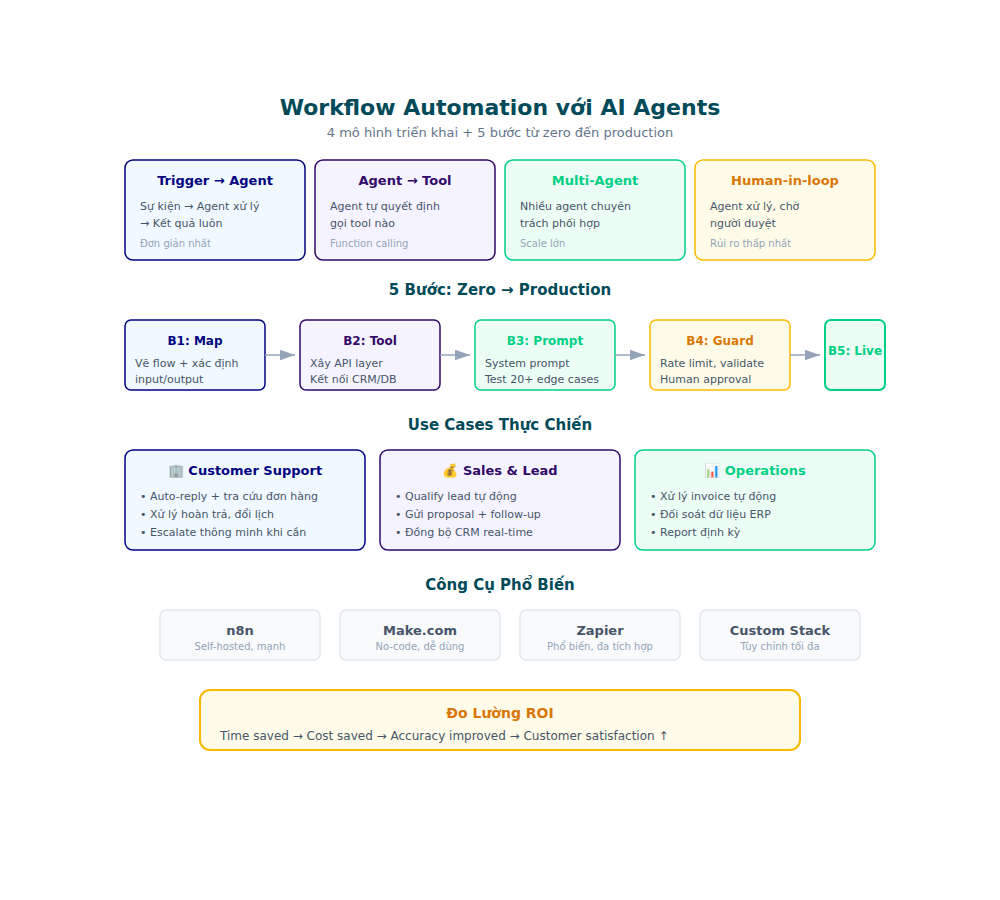
Model 1: Single-Agent Autopilot
An AI agent handles a single process end-to-end.
Use case: Email triage — agent reads inbox, categorizes, routes, draft reply.
When to use: The process has a narrow scope, clear input/output, little variation.
How to deploy:
- Map all decision points in the current process — draw a flowchart, note every branching
- Determine the data sources the agent needs to access (email, CRM, helpdesk, internal database)
- Set clear boundaries — the agent only acts within the defined scope, does not expand the scope itself
- Set up escalation rules for edge cases — clearly define when the agent must stop and transfer to a human
- Test with historical data before deploying — run the agent on 100-200 old cases, compare output with actual human decisions
Specific example: A SaaS company uses single-agent autopilot for email triage. The agent reads incoming support emails, categorizes them into 5 categories, extracts important information (account ID, issue type, urgency), and routes to the correct team. During 2 weeks of shadow testing, accuracy reached 94% — good enough for deployment.
Model 2: Multi-Agent Orchestration
Many specialized AI agents work together. Each agent takes care of one part — one agent collects data, another agent analyzes it, and a third agent executes. The orchestrator (or “manager agent”) coordinates the work flow between agents.
Read more about designing multi-agent systems in the article AI Agent Orchestration Explained.
Use case: Order fulfillment — agent 1 confirms order, agent 2 checks inventory, agent 3 creates shipping label, agent 4 sends notification.
When to use: The process has many heterogeneous steps and needs specialization.
Model 3: Human-in-the-Loop Hybrid
AI agents handle 80% of the workload, humans intervene at 20% of important decision points. This is the safest model for high-risk processes — AI does the heavy lifting, humans approve the important parts.
Use case: Content approval — AI draft, human review final. Invoice processing — AI extract data, human approval large amounts. Contract review — AI flags risky clauses, lawyer makes final decision.
When to use: Compliance or quality control requires human sign-off. Processes where mistakes have high costs (financial, legal, reputational).
Important note: Design human-in-the-loop so that there is no bottleneck. If the approver has to review 100% of cases, you haven’t really automated it — just moved the manual work elsewhere. Goal: humans only review cases where the agent flag is uncertain.
Model 4: Event-Driven Agent Networks
Agents are triggered by real-time events (webhooks, schedules, anomaly detection) instead of manual triggers. Each event can trigger an agent or chain of agents — creating a flexible response network.
Use case: Monitoring anomalies — agent detects spike traffic, automatically investigates, alerts team with root cause analysis. E-commerce: order failed → agent checks payment gateway, inventory, shipping API, sends diagnosis.
When to use: Operations need to react quickly to unusual events. System needs proactive instead of reactive.
Technical requirements: Event-driven agents need good infrastructure — message queues, event bus, monitoring. If you don’t have an observability stack yet, start with Model 1 or 3 first.
Implementation Strategy: 5 Steps From Zero to Production
Step 1: Audit — Map Current Process
Before automating, you must clearly understand what is running. Audit all operations workflows:
- List all processes running manual (from customer onboarding to monthly reporting)
- Measure time per process costs (per instance, per month)
- Identify bottlenecks — Which step is the slowest and causes the most errors?
- Classification process by complexity (low/medium/high) and frequency (daily/weekly/monthly)
Output: Process map with time and error data for each step.
Mom: Direct interview with 3-5 people in the team. They know best which processes are time-consuming and which processes are prone to errors. Don’t rely solely on process documentation — documentation is often outdated, reality is always different.
Step 2: Prioritize — Select Pilot Workflow
Don’t automate everything at once. Select pilot workflow according to the matrix:
| Criteria | High score when… |
|---|---|
| Frequency | Runs every day, many times |
| Volume | Handles 50+ instances/day |
| Error rate | Manual error > 5% |
| Time per instance | > 15 minutes manual work |
| Rule complexity | There is judgment needed but bounded |
Best Pilot: The process runs daily, high volume, takes time, but the logic is predictable enough for AI to handle 80%+ cases.
Tips for choosing a pilot: Don’t choose the most complicated process or the simplest one. Choose the process your team is complaining about the most — it’s where the pain points are clearest and the ROI is most visible.
Step 3: Design — Design Agent Workflow
With the pilot workflow selected, detailed design:
- Define inputs/outputs — what data goes in, what results come out
- Map decision tree — all branching logic, conditions, edge cases
- Select triggers — event trigger (webhook, schedule) hay manual trigger
- Set up guardrails — when does the agent have to escalate, rate limits, approval gates
- Error handling — fallback logic when the agent cannot handle it
- Data access requirements — which system does the agent need to access, what permissions do the agent need?
At this stage, if you need custom code for agent logic, tools like Automate with AI coding tools (only $18/month, supports Claude Code, Cline and 20+ coding tools) helps speed up the development process. Instead of writing code from scratch, you use AI coding assistant to scaffold agent logic, integrate APIs, and debug — reducing development time from weeks to days.
Step 4: Build — No-Code vs Low-Code vs Custom
No-Code Automation Platforms
Suitable for 80% of use cases. Tools like no-code AI automation platforms allows you to:
- Drag and drop to create workflow
- Connect AI models (GPT, Claude) into steps
- Set conditions and routing logic
- Monitor and debug visually
Advantages: Fast, anyone can do it, easy to maintain.
Limitations: Complex logic is sometimes limited by the platform.
Low-Code / Custom Agents
When the workflow is more complex — needs custom logic, specialized model, or deep integration with internal systems:
- LangGraph / CrewAI cho multi-agent orchestration
- Custom Python agents with frameworks like LangChain, AutoGen
- API-first approach — build agents like microservices
Advantages: Unlimited logic, optimized performance.
Limitations: Need dev resources, maintenance is more complicated.
Rules: Start with no-code. Only switch to low-code when you have proven the workflow works well and need more control.
Step 5: Test, Monitor, Iterate
Testing Strategy
- Shadow mode: Run the agent in parallel with the manual process, compare the results
- A/B testing: 50% traffic qua agent, 50% manual
- Edge case library: Create a set of test cases for all known exceptions
Monitoring Checklist
- Accuracy rate: % decisions are correct compared to the human baseline
- Escalation rate: % cases the agent must pass to the human
- Processing time: Compare before/after automation
- Error rate: Number of times the agent failed or produced wrong output
- Cost per transaction: API costs + infrastructure / number of transactions processed
Iteration Loop
Run for 2 weeks → Analyze escalation cases → Update agent logic → Re-test → Deploy
Repeat until accuracy rate > 95% and escalation rate < 10%.
Workflow Automation Tool with AI Agents
Layer 1: Orchestration Platforms
| Platform | Type | Suitable for |
|---|---|---|
| Zapier + AI | No-code | Workflows are simple, non-technical teams |
| Make (Integromat) | No-code | Workflows are more complex, with many branches |
| n8n | Low-code | Self-hosted, customization cao |
| Flowise | Low-code | AI-specific workflows, visual builder |
Layer 2: AI Agent Frameworks
| Framework | Language | Characteristics |
|---|---|---|
| LangGraph | Python/JS | Stateful multi-agent, production-ready |
| CrewAI | Python | Role-based agents, easy to set up |
| AutoGen | Python | Microsoft, conversational agents |
| OpenAI Assistants API | API | Managed, nhanh deploy |
Layer 3: Infrastructure
- Vector databases (Pinecone, Weaviate) cho RAG workflows
- Message queues (Redis, RabbitMQ) cho event-driven agents
- Monitoring (LangSmith, Phoenix) cho agent observability
- Orchestration (Temporal, Inngest) cho durable workflows
5 Practical Workflow Automation Use Cases for Operations Teams
Use Case 1: Customer Support Triage
Previous: Agent support reads every ticket, manually classifies and routes to the correct team.
Sau automation:
- AI agent reads incoming ticket
- Classification: complaint, question, billing, technical
- Extract key info: urgency, product, account tier
- Route automatically goes to the correct team queue
- Draft reply template cho simple questions
- Escalate high-urgency cases with context summary
Result: Reduced time-to-first-response by 70%, misrouting by 40%.
Use Case 2: Data Pipeline Automation
Previous: Ops team manually export CSV from 3-4 sources, clean data, upload to warehouse.
Sau automation:
- Schedule agent runs daily
- Agent pulls data from APIs (CRM, ads platforms, support tool)
- Validate and clean data automatically (detect anomalies, fill missing values)
- Transform according to standard schema
- Load into data warehouse
- Send Slack summary if there are anomalies
Result: Eliminate 4-6 hours of manual work per week, reducing data errors by 90%.
Use Case 3: Approval Workflows
Previous: Email chain for all approvals — purchase orders, time-off, budget requests.
Sau automation:
- Request submitted to form/platform
- AI agent determines approval chain based on type and amount
- Auto-route to the correct approvers
- Follow-up reminder if not approved after SLA
- Log the entire audit trail
Result: Reduced approval cycle time from 3-5 days to 1 day, 100% audit trail.
Use Case 4: Report Generation
Previous: Team spends 4-6 hours per week compiling weekly report.
Sau automation:
- Agent pulls data from dashboard APIs
- Generate charts and summary
- Draft report with insights (not just numbers — but trends, anomalies, recommendations)
- Distribute qua Slack/email theo schedule
Result: Reduced report creation time by 90%, consistent format, no missing data.
Use Case 5: Onboarding Automation
Previous: HR/IT manually setup accounts, send welcome pack, schedule training.
Sau automation:
- New hire data entered into HR system
- AI agent trigger onboarding workflow
- Create accounts (email, Slack, tools) according to role template
- Send personalized welcome sequence
- Schedule orientation meetings
- Track completion and follow-up missing steps
Result: Reduce onboarding time from 5 days to 1 day, zero missed steps.
Common Mistakes When Implementing AI Agent Workflow
Error 1: Automating an unstandardized process
If manual processes are running in disarray — each person doing their own thing — automation will duplicate that chaos. Standardize first, automate later.
Error 2: Missing escalation logic
AI agent cannot handle 100% of cases. If you do not design a clear escalation path, the agent will silently-fail or produce incorrect output without anyone knowing.
Fix: Every workflow must have a fallback — when the agent is unsure, escalate to the human with full context.
Error 3: Over-engineered from the beginning
Don’t build a multi-agent system right from the pilot. Start with single-agent, simple, measurable. Scale once ROI is proven.
Error 4: Ignoring data quality
Agent is only as good as the data it receives. If input data is dirty, inconsistent, or missing — output will be unreliable.
Fix: Add a data validation step before all agent processing.
Error 5: No monitoring after deploying
Deploy and forget — this is the fastest way for the agent to drift away from intended behavior. Set up monitoring from day 1.
Fix: Create a dashboard that tracks accuracy rate, escalation rate, and processing time. Set alert when metrics drop below threshold. Review escalation cases weekly to improve agent logic.
Error 6: Not taking into account change management
Automation changes the way teams work. If you don’t communicate clearly — the team will be resistant, work around the agent, or not trust the output.
Fix: Involve team from the audit stage. Explain why automate, what will change, what will not. Training is clear. Feedback loop for the team to report issues.
Error 7: Forgetting security and compliance
AI agents access sensitive data (customer info, financial data, internal comms). Without access controls and audit trails, you are creating a compliance nightmare.
Fix: Design least-privilege access for agents. Log every action. Review access periodically. Ensure compliance with data regulations (PDPA, GDPR if applicable).
Measuring the ROI of Workflow Automation
Core KPIs
| KPI | Recipe | Target |
|---|---|---|
| Time saved per instance | Manual time − Automated time | > 70% reduction |
| Throughput increase | Instances/day after ÷ before | > 3x |
| Error rate reduction | Manual error % − Automated error % | > 90% reduction |
| Cost per transaction | (API + infra cost) / transactions | < Manual cost |
| Escalation rate | Escalated cases / total cases | < 10% |
Calculate Actual ROI
Monthly savings = (Time saved per instance × Hourly rate × Monthly volume)
Monthly cost = (API costs + Platform costs + Maintenance hours × Hourly rate)
ROI = (Monthly savings − Monthly cost) / Monthly cost × 100%
For example:
– Email triage: 15 minutes/ticket × 200 tickets/day × 22 days = 1,100 hours/month saved
– Assuming hourly rate $25 → $27,500 saved/month
– API + platform cost: ~$500/month
– ROI: ~5,400% (not typo — automation ROI is very high when volume is large)
Benchmark By Industry
| Industry | Pilot workflow is popular | Typical ROI |
|---|---|---|
| E-commerce | Order processing, inventory sync | 500-1000% |
| SaaS | Support triage, onboarding | 1000-5000% |
| Fintech | Compliance check, report generation | 300-800% |
| Logistics | Shipment tracking, exception handling | 400-1200% |
Process Automation: 90-Day Roadmap
Month 1: Foundation
- Week 1-2: Audit workflows, select pilot, map decision trees
- Week 3-4: Build pilot workflow on no-code platform, shadow test
Month 2: Scale
- Week 5-6: Deploy pilot, monitor metrics, iterate
- Week 7-8: Onboard workflow #2 and #3, starting to see the compound effect
Month 3: Optimize
- Week 9-10: Optimize agent logic based on 2 months of data, reducing escalation rate
- Week 11-12: Evaluate low-code for workflows that need custom logic, plan next quarter
Milestone Checklist
- 30 days: Pilot workflow runs stably, accuracy > 90%
- 60 days: 3 automated workflows, measurable ROI documented
- 90 days: Escalation rate < 10%, team self-maintaining, plan Q2
Get Started Today
Workflow automation with AI agents is no longer a trend — it is a competitive advantage that every operations team needs. Start with a pilot workflow, measure results, and scale gradually.
Are you ready to automate processes for your team? Discover more about no-code AI automation to get started without a dev team, or read about AI agent orchestration when you need to coordinate more complex agents.
Question for you: Which process in your operations team is taking the most time? That is the first pilot workflow that should be automated.