Operations teams are where work either moves or gets stuck. They sit between sales, customer success, finance, HR, leadership, and sometimes clients. That means they spend a lot of time answering requests, routing information, chasing updates, and making sure the next step actually happens.
That kind of work is valuable, but it is also repetitive. In many companies, the same person is copying data between tools, collecting status updates, preparing reports, and following up on the same tasks every week. This is exactly where AI for operations teams can make a real difference.
The goal is not to replace the team. The goal is to remove the low-value work around the workflow so humans can spend more time on judgment, coordination, and exception handling.

This guide goes deeper than a basic automation overview. It shows what operations teams can automate, how to structure the workflow, what metrics to track, and how to roll out a first pilot without creating chaos.
What operations teams actually do
Before automating anything, it helps to name the real work. Operations teams usually manage a mix of:
- request intake from internal stakeholders
- task routing and ownership assignment
- daily or weekly reporting
- cross-team handoffs
- SOP and policy lookup
- exception handling and escalation
- follow-up and reminder management
These tasks are not glamorous, but they are the backbone of execution. When they are slow, the whole company feels it.
That is why AI agent automation works well here: the work is structured enough to automate, but messy enough that rule-only automation often breaks. AI can read the request, understand the context, and decide when to route, summarize, or escalate.
Why AI is a strong fit for operations workflows
Most operations processes share four traits:
- They are high-volume. The same kind of request appears again and again.
- They are multi-source. Inputs come from email, Slack, forms, spreadsheets, and tools.
- They depend on coordination. A request rarely ends with one person.
- They have exceptions. Missing fields, unusual priorities, and policy edge cases are normal.
Classic automation tools are good at fixed rules. AI is useful when the input is variable but the intent is still clear. That is the sweet spot for operations teams.
For a broader view of how agents are designed, see AI agent architecture and security guardrails for AI agents.
Where to use AI first
The best first use cases are the ones with clear input, clear output, and obvious pain.
1. Request triage
Operations inboxes are often a mix of questions, requests, approvals, and exceptions. An AI agent can classify the message, extract key fields, and send it to the right owner.
Example: a Slack message says, “Can someone update the vendor approval status for Acme by Friday?” The agent can identify the request type, owner, deadline, and urgency, then open the task in the correct queue.
2. Daily reporting
Instead of manually pulling numbers from several tools, the agent can collect data, compare it to the previous day or week, and produce a short summary for the team.
Example: open tasks, overdue items, pending approvals, SLA breaches, and exceptions are summarized into one update.
3. Cross-team handoffs
When one team finishes work, the next team usually needs context. AI can package the handoff with the right files, notes, and status history.
Example: when finance approves a request, the agent sends the summary and attachments to operations, so nobody needs to hunt for the thread.
4. SOP lookup
People often waste time asking the same internal questions. An AI assistant can surface the approved SOP, template, or policy instead of making someone search across folders and chat history.
5. Exception escalation
AI should not guess when something is missing or risky. It should summarize the problem, collect the missing details if possible, and escalate to a human with context.
How a good AI operations workflow should work
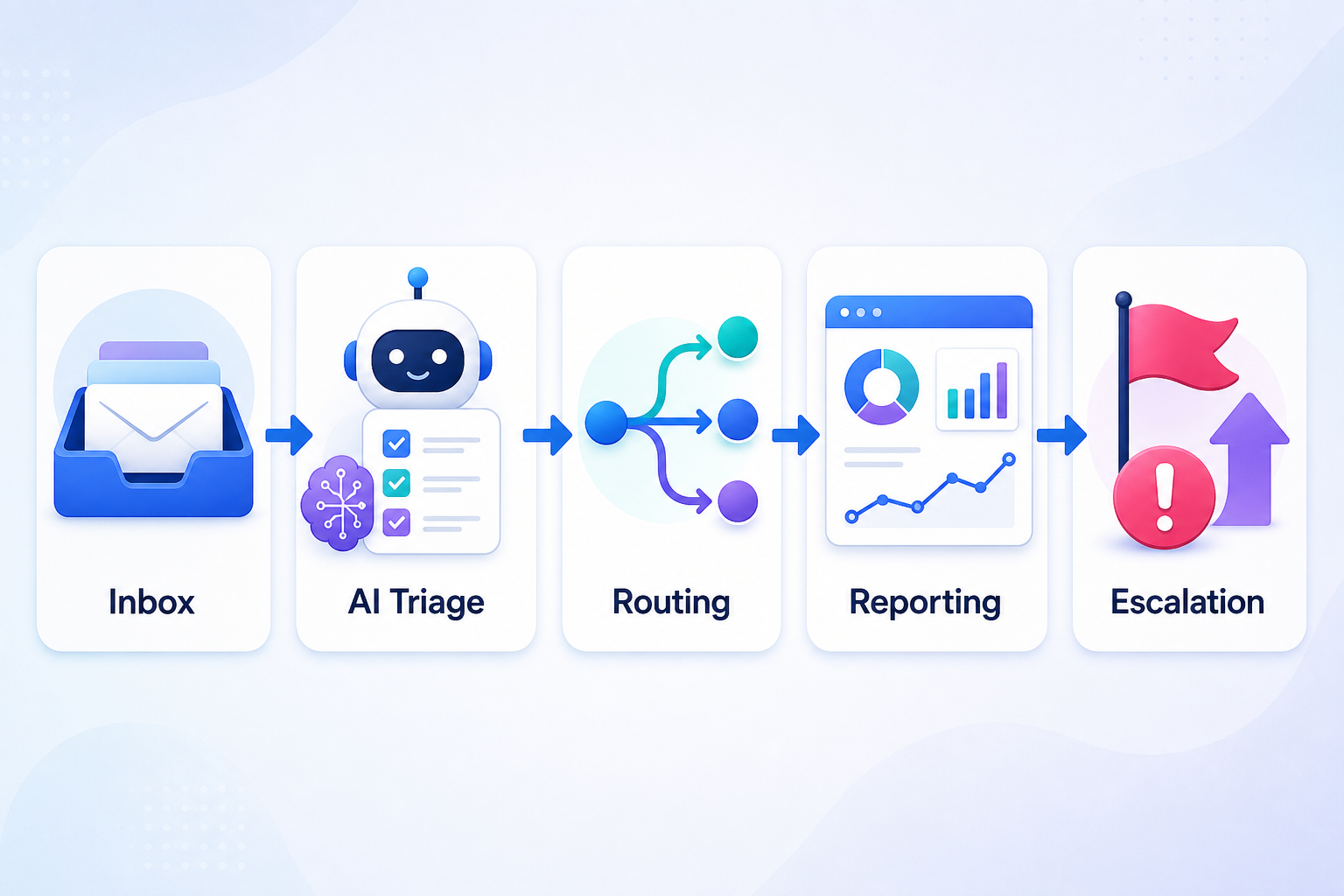
A solid workflow usually follows this sequence:
- Ingest requests from email, Slack, forms, or internal systems.
- Classify the request type and urgency.
- Extract the important fields such as owner, deadline, region, client, and priority.
- Validate against business rules or source systems.
- Route the request to the right person or queue.
- Log everything for visibility and auditability.
- Escalate edge cases when the agent is not confident.
This sequence matters because it turns AI from a chat interface into a real operating layer.
Practical example: a weekly ops reporting agent
Imagine an operations team that sends a status update every Monday morning. Today the process looks like this:
- one person checks several dashboards
- another person asks three teams for updates
- someone copies numbers into a slide or doc
- a manager edits the final summary before sending it out
With AI, the flow can be simpler:
- the agent pulls metrics from the project tracker and ticketing system
- it identifies overdue items and blocked requests
- it drafts a concise summary
- a human reviews the report before publishing
That does not remove oversight. It removes the busywork.
What to track so the pilot is actually useful
If you are rolling out AI for operations teams, do not measure only “did it work.” Measure the operational impact.
- Time saved per week — how many hours are no longer spent on manual collection or routing.
- Response time — how fast requests move from intake to owner.
- Escalation rate — how often the agent needs human help.
- Error rate — how often the AI misroutes or misclassifies work.
- Adoption — whether the team actually uses the workflow after launch.
If the pilot reduces time but creates confusion, it is not a win. The best automation feels invisible to the people using it.
Recommended rollout plan
The first version should be small. Very small.
Phase 1: one workflow
Pick one repetitive, annoying process with a clear owner. Good candidates are reporting, request triage, or meeting follow-up.
Phase 2: human-in-the-loop
Let the agent draft, classify, or route, but keep approval on anything that affects customers, money, or policy.
Phase 3: logging and review
Store the decisions so you can inspect why the agent acted the way it did.
Phase 4: expand only after stability
Once one workflow is stable, copy the pattern to the next one.
If you want a lighter way to get started, no-code AI automation can be enough for the first pilot.
Common mistakes
- Automating a broken process. If the manual workflow is unclear, AI just speeds up the confusion.
- Skipping validation. Routing is one thing; wrong customer action is another.
- Using AI only as a chat layer. Operations automation should end in action, not just a text response.
- Ignoring edge cases. The weird requests are often where the real business value lives.
FAQ
What is AI for operations teams?
It is the use of AI agents to help operations teams intake requests, route work, generate reports, coordinate handoffs, and handle exceptions with less manual effort.
Which operations tasks are easiest to automate?
Request triage, reporting, handoffs, and SOP lookup are usually the easiest because they are repetitive and rule-heavy.
Do I need code to start?
Not always. Many pilots can be built with no-code or low-code tools if the workflow is simple enough.
How do I keep the system safe?
Use validation rules, human approval for sensitive steps, audit logs, and clear escalation paths.
What should I automate first?
Start with one workflow that is high-volume and annoying, but low-risk enough to pilot safely.
How do I know the pilot worked?
Track time saved, response time, error rate, and adoption over the first two weeks.
Conclusion
AI for operations teams is not about replacing people. It is about making the team faster, calmer, and more reliable by removing repetitive coordination work.
When you automate the boring parts of routing, reporting, and handoffs, the team gets more time for judgment and problem-solving. That is the kind of automation that actually sticks.
Want help mapping the first workflow? Talk to Agoobi and we will help design the pilot.